
 Operation Search
Turning the power on, and setting the date and time
-
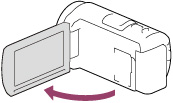
Open the LCD screen of your camcorder and turn the power on.
-
You can also turn on the camcorder by pressing POWER.
-
Select the desired language, then select [Next].
-
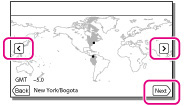
Select the desired geographical area with
 /
/  , then select [Next].
-
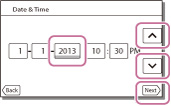
Set [Daylight Savings] or [Summer Time], select the date format and the date and time.
-
If you set [Daylight Savings] or [Summer Time] to [On], the clock advances 1 hour.
-
When you select the date and time, select one of the items and adjust the value with
 /
/  .
.
-
When you select


 , the date and time setting operation is complete.
To change the language setting
 [Setup] [
 General Settings] [Language Setting] a desired language.
To turn off the power
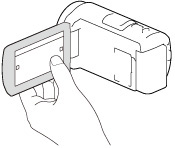
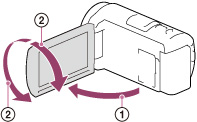
To adjust the angle of the LCD screen
 ), and then adjust the angle (
 ).
).
-
The recording date and time are recorded automatically on the recording media. They are not displayed during recording. However, you can check them as [Data Code] during playback. To display them, select
[Setup] [ Playback Settings] [Data Code] [Date/Time].
-
Once the clock is set, the clock time is automatically adjusted with [Auto Clock ADJ ] and [Auto Area ADJ] set to [On]. The clock may not automatically adjust to the correct time, depending on the country/region selected for your camcorder. In this case, set [Auto Clock ADJ ] and [Auto Area ADJ] to [Off] (models with GPS).
