
 Getting started
Deleting Multiple Items at Once
You can delete multiple items at once. This is convenient for clearing up space on the Reader.
The following instructions use the [Boeken] application as an example; this feature is also available in other applications.
-
Press the
 (Home) button
  tap [Boekenplanken].
-
Press the
 (Menu) button.
-
Tap [Boeken verwijderen].
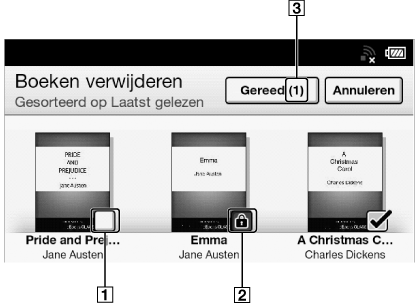
Boxes appear next to the thumbnails or list entries.
-
Box
-
Protect icon
-
Selected number of items
-
Tap to check the items to delete.
You can press the (Menu) button tap [Alles selecteren] if you wish to delete all items.
(Menu) button tap [Alles selecteren] if you wish to delete all items.-
Tap [Gereed].
-
Tap [Ja] when prompted.
The selected items are deleted from the Reader.
Note
-
If [Boeken] is not shown, press the
(Menu) button tap [Boekenplank kiezen] to show [Boeken].
-
Depending on the application, it may not be possible to delete certain files.
-
Sony recommends that you create a backup of your files using the Reader software.
