
 Getting started
Finding Annotations Across All Books
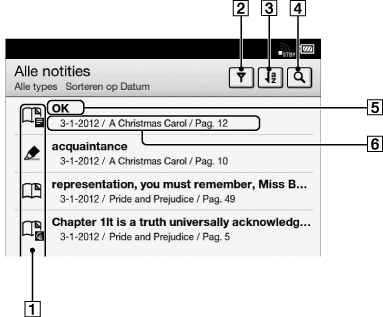
You can use [Alle notities] to find annotations across all books. The application stores all annotations including bookmarks, highlights and drawings that you have added on pages. Tap an item in the list to jump to the page on which that annotation is located.
-
Press the
 (Home) button
  tap [Applicaties] [Alle notities].
-
Note icons Details
-
Filter note type Details
-
Sort icon; sort by date, title or file name
-
Search icon Details
-
Headline (the highlighted text, the text note, the beginning text of the bookmarked page, or the beginning text of the page with the handwritten note)
-
Annotation creation date, book title, page number
-
Tap a note in the list.
The page containing the selected note is displayed.
To return to [Alle notities], press the  (Back) button.
(Back) button.To delete annotations, see Details.
