
 Before Use
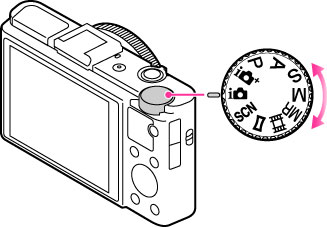
List of mode dial functions
Set the mode dial to the desired function.
 (Intelligent Auto) (Intelligent Auto) |
Allows you to shoot still images with the settings adjusted automatically.
|
 (Superior Auto) (Superior Auto) |
Allows you to shoot still images in higher quality than with Intelligent Auto mode.
|
 (Program Auto) (Program Auto) |
Allows you to shoot with the exposure adjusted automatically (both the shutter speed and the aperture value (F value)). Also you can select various settings using the menu.
|
 (Aperture Priority) (Aperture Priority) |
Allows you to adjust the focus range or degree of background defocus.
|
 (Shutter Priority) (Shutter Priority) |
Allows you to shoot fast-moving subjects etc., by manually adjusting the shutter speed.
|
 (Manual Exposure) (Manual Exposure) |
Allows you to shoot after manually adjusting the exposure (both the shutter speed and the aperture (F value)).
|
 (Memory recall) (Memory recall) |
Allows you to shoot an image after recalling often-used modes or numeric settings registered in advance.
|
 (Movie) (Movie) |
Allows you to change the setting for movie recording.
|
 (Sweep Panorama) (Sweep Panorama) |
Allows you to shoot a panoramic image after composing the image.
|
 (Scene Selection) (Scene Selection) |
Allows you to shoot with preset settings according to the scene.
|
Related Topic
