
 Operation Search
To record in mirror mode
-
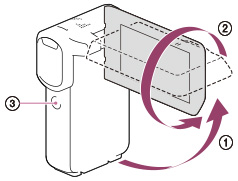
Open the LCD panel 90 degrees to the camcorder (
 ), then rotate it 270 degrees to the lens side (
 ).
).
-
Press SELF-REC button (
 ) to start recording.
-
A mirror-image of the subject appears on the LCD screen, but the image will be normal when recorded.
-
You can only record in mirror mode when the LCD panel is rotated 270 degrees to the lens side because [[SELF-REC] Button] is set to [Front-facingLCD only] in the default setting. You can change the setting of the SELF-REC button to keep the button always activated.
-
Movies are recorded when the
 (Movie) mode is selected, and photos are recorded when the
  (Photo) mode is selected.
-
Using [Self-portrait 1 Person] or [Self-portrait 2 People] of the [
 Self-Timer] setting will reduce camera shake when shooting photos in mirror mode.
