


Using MENU items (Shooting)
You can select various shooting functions easily from the MENU button.
- Press the ON/OFF (Power) button and set the camera to shooting mode.
- Press the MENU button to display the Menu screen.

- Select the desired menu item with
 /
/ /
/ /
/ on the control button.
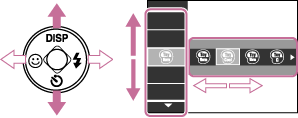
- Press
 on the control button.