


- Top Page >
- Parts Description >
- Right
Right

 (Power)
- PROG +/–
 +/– (Volume)
 (Input select)
- HOME
- ENERGY SAVING SWITCH
The indicator on the front of the TV will light up when the following buttons  -
- (located on the back of the TV) are touched or pressed.
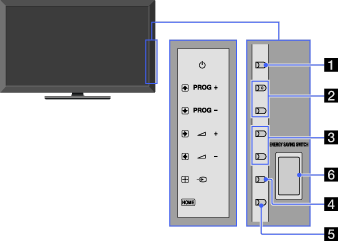
- (Power)
Press to turn on the TV or to enter standby mode.

- When ENERGY SAVING SWITCH is off, the TV cannot be turned on.
- PROG +/–
Press to select the next (+) or previous (–) channel.
- In the TV menu, these buttons will work as
 /
/ .
.
- In the TV menu, these buttons will work as
- +/– (Volume)
Press to adjust the volume.
- In the TV menu, these buttons will work as
 /
/ .
.
- In the TV menu, these buttons will work as
- (Input select)
Press to display a list of inputs.
- In the TV menu, this button will work as
 .
.
- In the TV menu, this button will work as
- HOME
Press to display the TV Home Menu.
- ENERGY SAVING SWITCH
Press to turn the TV on or off. When ENERGY SAVING SWITCH is switched off, power consumption is reduced.
- When ENERGY SAVING SWITCH is switched off, you will not be able to perform functions such as saving clock settings.
