


- Top Page >
- Fun Features with Connected Equipment >
- Audio System
Audio System

Connect an audio amplifier or home theatre system with digital input to your TV or built-in PlayStation(R)2.
Audio System with Optical Audio Cable
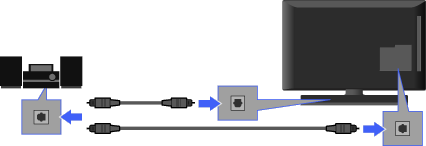
Audio System
TV
Built-in PlayStation(R)2
or
Optical Audio cable (not supplied)

- You need to configure the TV “Optical Out” settings or the built-in PlayStation(R)2 “Digital Out” settings according to your audio system.
- If you connect to the TV, TV and built-in PlayStation(R)2 audio will be output. However, the PlayStation(R)2 audio will not be output as digital audio (5.1ch, etc.).If you want to output digital audio from the PlayStation, connect the optical audio cable to the PlayStation(R)2.
Audio System with HDMI Cable
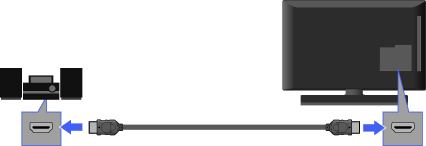
HDMI cable (not supplied)
Audio System
TV
- When connecting a digital audio system that is compatible with “Control for HDMI” (“BRAVIA” Sync) and Audio Return Channel (ARC) technology, connect to HDMI IN 1 with an HDMI cable. If connecting a system that is incompatible with “Control for HDMI” or Audio Return Channel, an additional audio connection via DIGITAL AUDIO OUT (OPTICAL) is necessary.
Audio System with Audio Cable
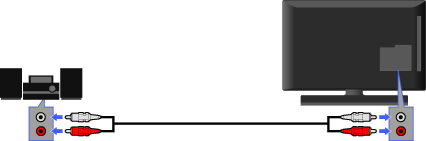
Audio cable (not supplied)
Audio System
TV

- When using an external audio system, audio out of the TV can be controlled using the TV’s remote.
