


- Top Page >
- Parts Description >
- Left
Left
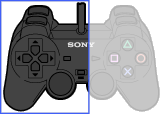
- L2 button
- L1 button
- SELECT button
- Directional buttons
- Left analog stick/ L3 button
- ANALOG mode button
- Mode indicator
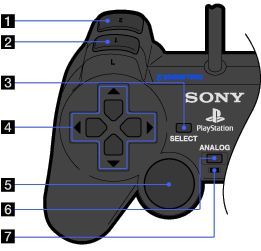
- L2 button
- L1 button
- SELECT button
- Directional buttons
- Left analog stick/ L3 button

- The left analog stick and L3 button, function only in analogue mode (indicator: red).
- The L3 button function when the analog stick is pressed.
- ANALOG mode button
Switch between digital mode and analogue mode.
- Mode indicator
Digital mode: Lights off.
Analogue mode: Lights up in red.
- Depending on the software, you may not be able to switch modes even if you press the ANALOG mode button.
- Depending on the software, the buttons for use in analogue mode may be limited. Refer to the instructions supplied with the software for details.
- The vibration function can be set to on or off in the software options menu. Depending on the software, the vibration function may be set to on automatically.
