


- Top Page >
- Parts Description >
- Middle
Middle
 (Favourites)
 GUIDE
GUIDE /
/ (Info/Text reveal)
 /
/ /
/ /
/ /
/
 RETURN
- OPTIONS
- HOME
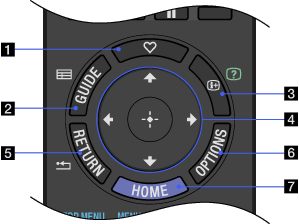
- (Favourites)
Press to display the “Favourites” menu of the TV.
- GUIDE
Press to display the digital programme guide of the TV.

- The Guide feature is available depending on your region/country.
- This button is unavailable for PlayStation(R)2.
- / (Info/Text reveal)
Each time you press the button, the display changes as follows:
In digital mode (TV): Details of the current programme → Details of the next programme
In analogue mode (TV): Current channel number and screen mode
In Text mode: Reveals hidden information (e.g., answers to a quiz).
PlayStation(R)2 function: Control panel
- ////
TV function: Press
/// to move the on-screen cursor. Press to select/confirm a highlighted item.PlayStation(R)2 function: Press
/// to move the on-screen cursor. Press to enter/confirm a highlighted item. - RETURN
TV function: Press to return to the previous screen or exit from the TV menu.
PlayStation(R)2 function: Press to return to the previous screen or exit from the PlayStation(R)2 menu.
- OPTIONS
Press to display a list of convenient functions and menu shortcuts. The menu items vary based on the current input and/or content.
- This button is unavailable for PlayStation(R)2.
- HOME
Press to display the TV Home Menu.
