


- Top Page >
- Parts Description >
- Top
Top
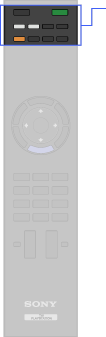
- PlayStation 2 POWER ON
- TV
 (TV standby)
 - Function buttons
 (Screen Format)
 /
/ (Input select/Text hold)
- THEATRE
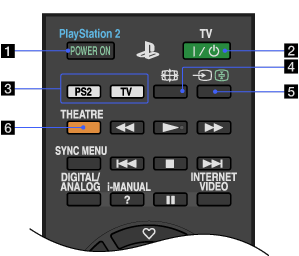
- PlayStation 2 POWER ON
Press to turn on the built-in PlayStation(R)2. The TV and the PlayStation(R)2 turn on and the TV input mode is automatically switched to PlayStation(R)2.
- TV (TV standby)
Press to turn on the TV or to enter standby mode.

- When you turn the TV off, the TV and the built-in PlayStation(R)2 enter standby mode.
- Function buttons
Switches the TV function or the built-in PlayStation(R)2 function on the remote and switches the input source between TV and PlayStation(R)2 automatically.
- (Screen Format)
Press to change the screen format.
- / (Input select/Text hold)
In TV mode: Press to display a list of inputs.
In Text mode: Press to hold the current page.
- THEATRE
Set “Theatre Mode” to on for optimum sound and picture quality of film-based content.
- If you turn the TV off, “Theatre Mode” is also turned off.
- When you change the “Scene Select” setting, “Theatre Mode” turns off automatically.
