


- Top Page >
- Parts Description >
- Upper
Upper
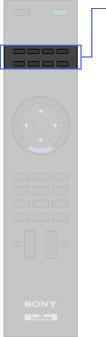
- SYNC MENU
- Optional Equipment operating buttons
- DIGITAL/ANALOG
- i-MANUAL
- INTERNET VIDEO
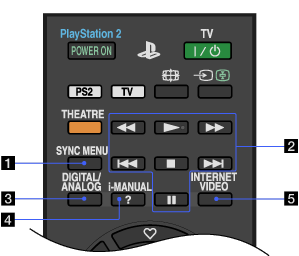
- SYNC MENU
Press to display the “BRAVIA” Sync Menu and then select the connected HDMI equipment from “HDMI Device Selection” of the TV.

- “Control for HDMI” (“BRAVIA” Sync) is only available for the connected Sony equipment that has the “BRAVIA” Sync logo or is compatible with “Control for HDMI”.
- Optional Equipment operating buttons
TV function: Operate the “BRAVIA” Sync-compatible equipment connected to the TV.
 /
/ : Fast reverses/fast forwards when pressed during playback.
 /
/ : Go to the beginning of the previous/next title/chapter/track/file.
 : Play at normal speed.
 : Stop playback.
 : Pause playback.
PlayStation(R)2 function: Operate the CD/DVD player.
/ : Fast reverses/fast forwards when pressed during playback./ : Go to the beginning of the previous/next title/chapter/track/file.: Play at normal speed.: Stop playback.: Pause playback. - DIGITAL/ANALOG
Press to switch between digital and analogue mode of the TV.
When viewing pictures from connected equipment, press to return to the TV mode.
- i-MANUAL
Press to display the on-screen instruction manual (this manual).
- INTERNET VIDEO
Press to access Internet content on the “XMB” of the TV.
