


- Top Page >
- Parts Description >
- Front (PlayStation(R)2)
Front (PlayStation(R)2)
- MEMORY CARD slot 1/2
- Controller port 1/2
 USB connector
- Disc cover
- OPEN button
 (on/standby)/RESET button
- (on/standby) indicator
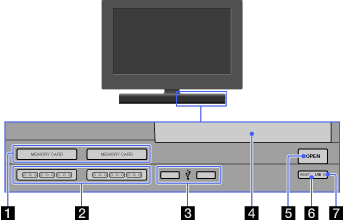
- MEMORY CARD slot 1/2
Insert a memory card.
- Controller port 1/2
Insert the Analog Controller (DUALSHOCK(R)2) into a controller port of the PlayStation(R)2.
- USB connector
You can connect various USB devices to the built-in PlayStation(R)2, but not all are compatible. Refer to the instructions supplied with the USB device for more information.

- You cannot play photo, music, video files using the PlayStation’s USB connector.
- Disc cover
Press the OPEN button, and the cover slides open.
- OPEN button
Press to open the disc cover.
- (on/standby)/RESET button
Press to turn on the built-in PlayStation(R)2, to enter standby mode, or to reset.
RESET: Press once.
Standby: Press for more than one second.
- (on/standby) indicator
Lights up in green when the built-in PlayStation(R)2 is on.
Lights up in red when the built-in PlayStation(R)2 is in standby mode.
