


- Top Page >
- Parts Description >
- Front (TV)
Front (TV)

- Ambient sensor
- Remote control sensor
 (Picture Off/Timer)
 (Standby)
- I (Power)
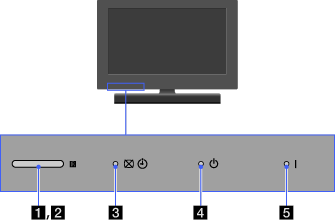
- Ambient sensor
Senses the ambient light level and adjusts the brightness and colour temperature of the picture accordingly.
Do not put anything near the sensor, doing so may affect its function.
- Remote control sensor
Receives signals from the remote.
Do not put anything near the sensor, doing so may affect its function.
- (Picture Off/Timer)
Lights up in green when you select “Picture Off”.
Lights up in orange when you set the timer.
Lights up and/or blinks in orange during a software upgrade.
- (Standby)
Lights up in red when your TV is in standby mode, PC power saving mode or during a software upgrade.
- I (Power)
Lights up in green when the TV is on.
