


PC
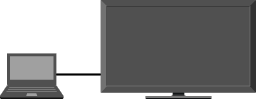
Enjoy music, pictures and other content from your PC by connecting it with dedicated cables.
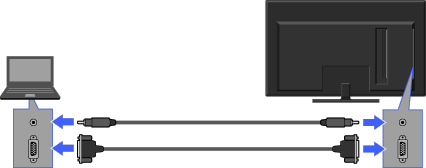
PC
Audio cable (not supplied)
D-sub 15 cable (not supplied)
TV

- It is recommended to use a PC cable with ferrites, or an equivalent.
- You can connect an HDMI-compatible PC with an HDMI cable.
PC Input Signal Reference Chart
- VGA
- - Horizontal (Pixel)/Vertical (Line): 640/480
- - Horizontal frequency (kHz)/Vertical frequency (Hz): 31.5/60
- - Standard: VGA
- SVGA
- - Horizontal (Pixel)/Vertical (Line): 800/600
- - Horizontal frequency (kHz)/Vertical frequency (Hz): 37.9/60
- - Standard: VESA Guidelines
- XGA
- - Horizontal (Pixel)/Vertical (Line): 1024/768
- - Horizontal frequency (kHz)/Vertical frequency (Hz): 48.4/60
- - Standard: VESA Guidelines
- WXGA
- - Horizontal (Pixel)/Vertical (Line): 1280/768, 1280/768, 1360/768
- - Horizontal frequency (kHz)/Vertical frequency (Hz): 47.4/60, 47.8/60, 47.7/60
- - Standard: VESA
- SXGA (Full HD model only)
- - Horizontal (Pixel)/Vertical (Line): 1280/1024
- - Horizontal frequency (kHz)/Vertical frequency (Hz): 64.0/60
- - Standard: VESA
- HDTV* (Full HD model only)
- - Horizontal (Pixel)/Vertical (Line): 1920/1080
- - Horizontal frequency (kHz)/Vertical frequency (Hz): 67.5/60
- - Standard: CEA-861*
- This TV’s PC input does not support Sync on Green or Composite Sync.
- This TV’s PC VGA input does not support interlaced signals.
- For optimum picture quality, it is recommended to use the signals in the chart. In plug and play, signals with a 60 Hz vertical frequency will be detected automatically. (PC reboot may be necessary.)
* The 1080p timing when applied to the HDMI input will be treated as a video timing and not PC timing. This will affect “Preferences” and “Picture & Display” settings. To view PC content, set “Scene Select” to “Graphics,” “Wide Mode” to “Full,” and “Display Area” to “Full Pixel.”
