


- Top Page >
- Parts Description >
- Middle
Middle


 /
/ /
/ /
/ /
/


-
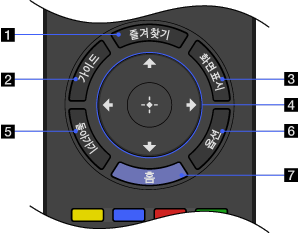
Press to display the “Favorites” menu.
-
Press to display the digital program guide.

- The Guide feature is available depending on your region/country.
-
Press once to display information about the channel/program/input you are viewing. The information will time out in a few seconds or press again to exit.
- ////
Press
/// to move the on-screen cursor. Press to select/confirm a highlighted item. -
Press to return to the previous screen or exit from the menu.
-
Press to display a list of convenient functions and menu shortcuts. The menu items vary based on the current input and/or content.
-
Press to display the TV Home Menu.
