


- Top Page >
- Parts Description >
- Upper
Upper
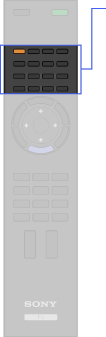
- THEATER
- BD/DVD buttons


- BD/DVD TOP MENU
- BD/DVD MENU



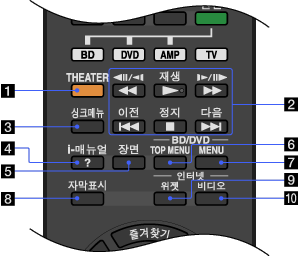
- THEATER
Set “Theater Mode” to on for optimum picture and sound quality of film-based content.

- If you turn the TV off, “Theater Mode” is also turned off.
- When you change the “Scene Select” setting, “Theater Mode” turns off automatically.
- “Control for HDMI” (“BRAVIA” Sync) is only available for the connected Sony equipment that has the “BRAVIA” Sync logo or is compatible with “Control for HDMI.”
- BD/DVD operating buttons
 /
/ : Fast reverse/fast forward the disc when pressed during playback.
 /
/ : Go to the beginning of the previous/next title/chapter/scene/track.
 : Play a disc at normal speed.
 : Stop the playback.
 -
Press to display the “BRAVIA” Sync Menu and then select connected HDMI equipment from “HDMI Device Selection.”
- “Control for HDMI” (“BRAVIA” Sync) is only available for the connected Sony equipment that has the “BRAVIA” Sync logo or is compatible with “Control for HDMI.”
-
Press to display the on-screen instruction manual (this manual).
-
Press to display the “Scene Select” menu. Select the desired scene option for optimum sound and picture quality.
- BD/DVD TOP MENU
Press to display the top menu of the BD/DVD disc.
- BD/DVD MENU
Press to display the BD/DVD disc menu.
-
Press to turn closed captions on, off or automatically display closed captions when sound is muted.
-
Press to display the “BRAVIA” Internet Widgets.
- “BRAVIA” Internet Widgets is available depending on your region/country.
-
Press to access Internet content on the “XMB.”
