


- Top Page >
- Parts Description >
- Right
Right

 USB
USB- PC IN
- HDMI IN 2/3
- SERVICE ONLY
- VIDEO IN 2, COMPONENT IN
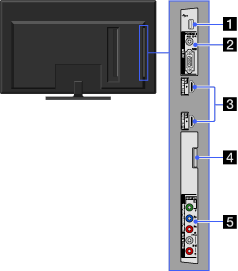
- USB
You can enjoy photo, music, video files stored on a USB device.
- PC IN
Connects to a personal computer’s video and audio output connector. Can also be connected to other analog RGB equipment.

- For some Apple Macintosh computers, it may be necessary to use an adapter (not supplied). If this is the case, connect the adapter to the computer before connecting the HD15-HD15 cable.
- It is indispensable to use a PC cable with ferrite cores.
- HDMI IN 2/3
HDMI (High-Definition Multimedia Interface) provides an uncompressed, all-digital audio/video interface between this TV and any HDMI-equipped audio/video equipment. In addition, when you connect the equipment that is compatible with “Control for HDMI,” communication with the connected equipment is supported.
- Be sure to use only an authorized HDMI cable bearing the HDMI logo.
- If connecting a digital audio system that is compatible with Audio Return Channel (ARC) technology, use the HDMI IN 1 on the rear of the TV. If not, an additional connection with DIGITAL AUDIO OUT (OPTICAL) is necessary.
- If the equipment has a DVI jack, connect it to the HDMI IN 2 through a DVI - HDMI adapter interface (not supplied), and connect the equipment’s audio out jacks to the PC/HDMI 2 AUDIO IN which is located in the PC IN.
- SERVICE ONLY
This port is only for service.
- VIDEO IN 2, COMPONENT IN (1080p/1080i/720p/480p/480i)
This input can be used as a composite video input or as a component video input.
For composite use, connect to VIDEO IN 2 for video, and to AUDIO (L/R) of COMPONENT IN for audio signals.
For component connection, use Y, PB, PR for video signals and also connect to AUDIO (L/R) for audio signals.
- The TV will automatically detect and switch between VIDEO IN 2 and COMPONENT IN. To manually set the input type, press
 , select
  > Channels & Inputs > Video 2/Component Selection.
- The TV will automatically detect and switch between VIDEO IN 2 and COMPONENT IN. To manually set the input type, press
