


- Top Page >
- Parts Description >
- Right
Right

 USB
USB PC IN
PC IN AUDIO OUT/
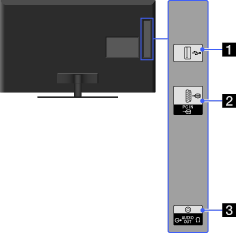
- USB
You can enjoy photo, music and video files stored on a USB device.
- PC IN
Connect a PC cable with ferrites.

- It is recommended to use a PC cable with ferrites.
- To input PC sound, connect to the AUDIO IN jack on the rear of the TV, using an audio cable.
- AUDIO OUT/
Connect with an audio cable or headphones. You can listen to TV sound through your stereo system or headphones.
To set the sound output for headphones or an external audio system, press HOME, select → [Sound] → [Headphone/Audio Out].
- When you set [Audio Out] in [Headphone/Audio Out], select [Fixed] or [Variable], press HOME, select → [Sound] → [Audio Out].
- When you set [Audio Out] in [Headphone/Audio Out], select [Fixed] or [Variable], press HOME, select
