


- Top Page >
- Parts Description >
- Top
Top
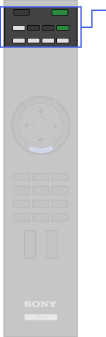
 /
/ (Input select/Text hold)
 (Light)
 (Wide mode)
- TV
 (TV standby)
 - 3D
- (Power)
- Function buttons
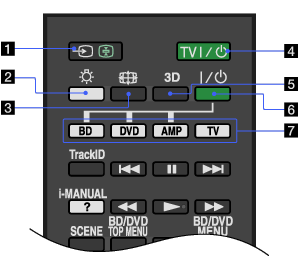
- / (Input select/Text hold)
In TV mode: Press to display a list of inputs.
In Text mode: Press to hold the current page.
- (Light)
Press to illuminate the buttons on the remote so that you can see them easily even if the room is dark.
- (Wide mode)
Press to change the wide mode.
- TV (TV standby)
Press to turn on the TV or to enter standby mode.
- 3D
Press to display the 3D Menu.
- (Power)
Press to turn on or off the optional equipment you have selected with the function buttons.
- Function buttons
Operate the corresponding equipment.
