


- Top Page >
- Parts Description >
- Upper
Upper
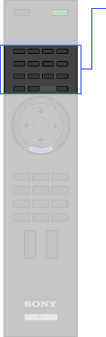
- TrackID
 i-MANUAL
- SCENE
- BD/DVD TOP MENU
- DIGITAL/ANALOG
 (Twin picture/PIP)
- BD/DVD operating buttons
- BD/DVD MENU
- INTERNET VIDEO
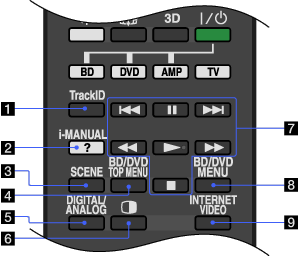
- TrackID
Searches for information about the music currently playing.
- i-MANUAL
Press to display the on-screen instruction manual (this manual).
- SCENE
Press to display the [Scene Select] menu. Select the desired scene option for optimum sound and picture quality.
- BD/DVD TOP MENU
Press to display the top menu of the BD/DVD disc.
- DIGITAL/ANALOG
Press to switch between digital and analogue mode.
When viewing pictures from connected equipment, press to return to the last viewed TV mode.
- (Twin picture/PIP)
Display two pictures simultaneously.
- BD/DVD operating buttons
 /
/ : Go to the beginning of the previous/next title/chapter/scene/track.
 /
/ : Fast reverse/fast forward the disc when pressed during playback.
 : Pause or re-start playback.
 : Play a disc at normal speed.
 : Stop playback.
 - BD/DVD MENU
Press to display the BD/DVD disc menu.
- INTERNET VIDEO
Press to access Internet content on the Home Menu.
