

Using the Tablet Device with the Cradle
Setting your tablet device in a cradle
-
Slide the foot of the cradle to its upper position. That allows you to plug in or unplug the AC adapter.
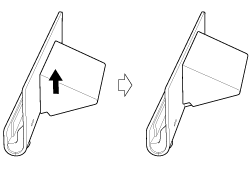
-
Plug the AC adapter in to the power cord connector at the bottom of a cradle.
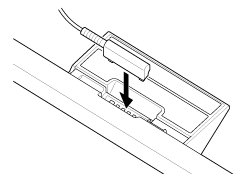
-
Plug the AC adapter in to the AC outlet (wall socket).
-
Align the charge connector of your tablet device with that inside the upper slot of the cradle.
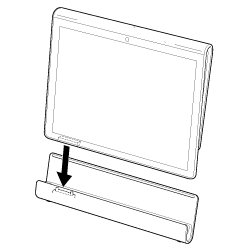
-
Place the tablet device in the upper slot of the cradle.
-
Make sure the charge indicator is lit.
-
When you hold or unplug the AC adapter, do not touch its terminal area.
-
Pulling the cable of the AC adapter forcedly when unplugging it from the cradle may break the AC adapter or cradle. So, be sure to hold the foot of the cradle.
-
When using the cradle foot at its lower position, run the AC adapter cord through the cutout of the cradle foot to prevent the cradle from falling over.
-
When placing your tablet device in the cradle while the strap attached, make sure the strap does not get caught between the tablet device and the cradle.
-
When you set your tablet device in the cradle for the first time, you will be prompted to select which application you want to start when using the cradle. If you check [Use by default for this action] and select an application, the selected application will start the next time you set your tablet device in the cradle.
-
To return to the default setting, tap [
 Apps] - [
 Settings] - [
 Applications] - [Manage applications] - (the application that is selected to start automatically). On the displayed application management screen, tap [Clear defaults]. The setting will be cleared.