

Reference
About the Home Screen
App shortcuts, status bars, widgets, and more are displayed on the Home screen. The Home screen consists of five pages, and you can flick left/right to scroll the pages.
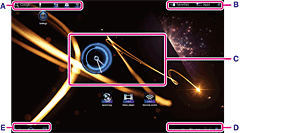
A: Quick search box/Quick launcher
-
Quick search box
- Tap the box to easily search [Details].
-
Quick launcher
- Tap icons in the Quick launcher to start apps. Since the Quick launcher is displayed on every page of the Home screen, registering apps you often use gives you quick access to them.
Hint
-
Tap and hold icons to sort them in the Quick launcher or move them in and out of the Quick launcher.
B: Favorites/Application launcher/Home screen customize
-
 Favorites
- Tap this to start Favorites
[Details].
-
 Apps
Apps
- Tap this to start the application launcher [Details].

- Tap this to customize the Home screen [Details].
C: Widget
Widgets are located on the Home screen [Details].
D: Digital clock
Tap this to display the notification panel [Details].
E: Basic operation buttons
-
 (Back): Tap this to return to the previous screen.
-
 (Home): Tap this to display the Home screen.
-
 (Recent Apps): Tap this to display the apps used recently [Details].
Related Topic