C_CntNet_Wired 【AEP/eng】
C_CntNet_Wired | FullScreen: Page 1
- block_id: 30803 «C_CntNet_Wired»
- Making a Connection
- block_id: 30804 «C_CntNet_Wired»
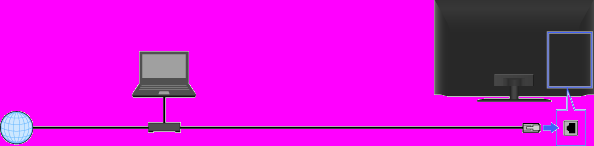
- A wired LAN connection allows you to access the Internet and your home network. Connect a LAN cable to your TV.
- block_id: 30805 «C_CntNet_Wired»
【img=i_equ_set_connect.full.png】- block_id: 30806 «C_CntNet_Wired»
- Internet
- block_id: 30807 «C_CntNet_Wired»
- TV
- block_id: 33935 «C_CntNet_Wired»
- PC
- block_id: 30808 «C_CntNet_Wired»
- Modem with router functions
- block_id: 37558 «C_CntNet_Wired»
- LAN cable
C_CntNet_Wired | FullScreen: Page 2
- block_id: 30809 «C_CntNet_Wired»
- Steps
- block_id: 30810 «C_CntNet_Wired»
- 1. Set up your LAN router.
- block_id: 30811 «C_CntNet_Wired»
- For details, refer to the instruction manual of your LAN router, or contact the person who set up the network connection (network administrator).
- block_id: 30812 «C_CntNet_Wired»
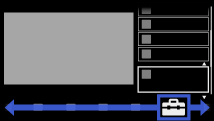
- 2. Press the HOME button, then select
 [Settings] at the bottom of the screen using the
  /
/ buttons.
- block_id: 30813 «C_CntNet_Wired»
【img=i_NUX_set.full.png】
C_CntNet_Wired | FullScreen: Page 3
- block_id: 30814 «C_CntNet_Wired»
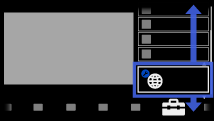
- 3. Select
 [Network] using the
  /
/ buttons, then press the
  button.
- block_id: 30815 «C_CntNet_Wired»
【img=i_NUX_set_network.full.png】- block_id: 30816 «C_CntNet_Wired»
- 4. Select [Network Set-up] using the / buttons, then press the button.
- block_id: 30817 «C_CntNet_Wired»
- 5. Select [Set up network connection] using the / buttons, then press the button.
C_CntNet_Wired | FullScreen: Page 4
- block_id: 37815 «C_CntNet_Wired»
- 6. Select [Auto] using the / buttons, then press the button.
- block_id: 30818 «C_CntNet_Wired»
- 7. Follow the on-screen instructions to complete the set-up.
- block_id: 30819 «C_CntNet_Wired»
- 8. After completing the set-up, select [Refresh Internet Content] using the / buttons, then press the button.
- block_id: 37963 «C_CntNet_Wired»
 You can jump to the setting screen from the page at the end.
- block_id: 30820 «C_CntNet_Wired»
- To return to the last viewed source, press the HOME button twice.
C_CntNet_Wired | Page 5_1
- block_id: 30821 «C_CntNet_Wired»
- Jump to the Setting Screen
- block_id: 30822 «C_CntNet_Wired»
- To close this manual and jump to the setting screen, press the button.
- block_id: 30823 «C_CntNet_Wired» AppLink:network_settings
- Jump to the Setting Screen
C_CntNet_Wired | FullScreen: Page 6
- block_id: 30824 «C_CntNet_Wired»
- Notes
- block_id: 30825 «C_CntNet_Wired»
- ・ The setting items (e.g. IP address, subnet mask, DHCP) may vary depending on the Internet service provider or router. For details, refer to the instruction manuals provided by the Internet service provider, or those supplied with the router. Or contact the person who set up the network connection (network administrator).


