C_DispSnd_AEP_GA_CHK_Snd_FSH 【AEP/eng】
| Level3 | EntryPoint | ||||||
|---|---|---|---|---|---|---|---|
| DispSnd_AEP_FSH | |||||||
C_DispSnd_AEP_GA_CHK_Snd_FSH | FullScreen: Page 1

- block_id: 38920 «C_DispSnd_AEP_GA_CHK_Snd_FSH»
- Steps
- block_id: 38921 «C_DispSnd_AEP_GA_CHK_Snd_FSH»
- While watching a programme, press the AUDIO button repeatedly to select the desired audio signal.
- block_id: 38922 «C_DispSnd_AEP_GA_CHK_Snd_FSH»
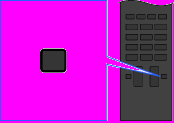
【img=i_wRM_audio_FSH.full.png】- block_id: 38923 «C_DispSnd_AEP_GA_CHK_Snd_FSH»
- AUDIO
- block_id: 38924 «C_DispSnd_AEP_GA_CHK_Snd_FSH»
- Tips
- block_id: 38925 «C_DispSnd_AEP_GA_CHK_Snd_FSH»
- ・ You can also change the sound mode in the Home Menu. Press the HOME button, select
 [Settings] →
  [Sound] → [Dual Sound], then the desired option.