C_DispSnd_AEP_Sformat_FSH 【AEP/eng】
C_DispSnd_AEP_Sformat_FSH | FullScreen: Page 1
- block_id: 38845 «C_DispSnd_AEP_Sformat_FSH»
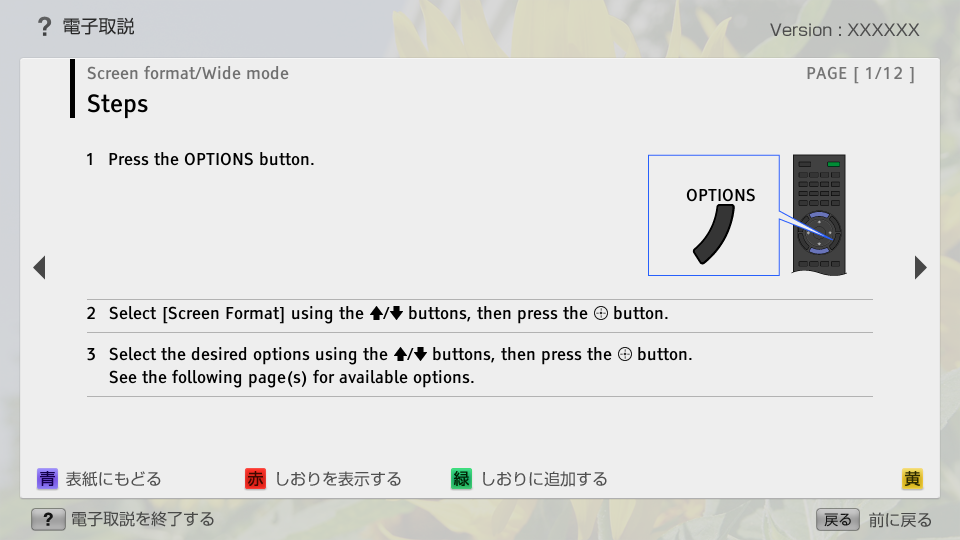
- Steps
- block_id: 38846 «C_DispSnd_AEP_Sformat_FSH»
- 1. Press the OPTIONS button.
- block_id: 38847 «C_DispSnd_AEP_Sformat_FSH»
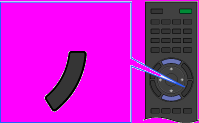
【img=i_wRM_option_FSH.full.png】- block_id: 40740 «C_DispSnd_AEP_Sformat_FSH»
- OPTIONS
- block_id: 38848 «C_DispSnd_AEP_Sformat_FSH»
- 2. Select [Screen Format] using the
 /
/ buttons, then press the
  button.
- block_id: 38849 «C_DispSnd_AEP_Sformat_FSH»
- 3. Select the desired options using the / buttons, then press the button.
See the following page(s) for available options.
C_DispSnd_AEP_Sformat_FSH | FullScreen: Page 2
- block_id: 38851 «C_DispSnd_AEP_Sformat_FSH»
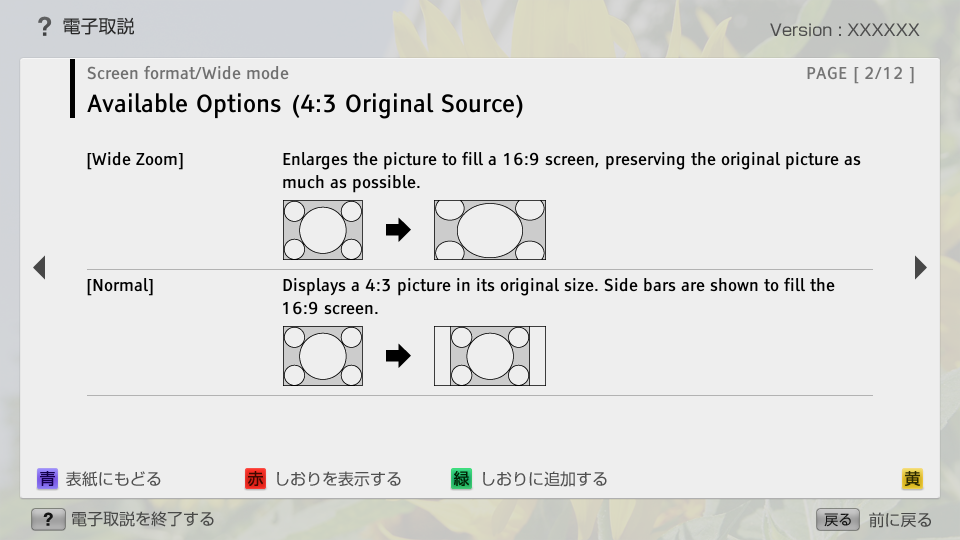
- Available Options (4:3 Original Source)
- block_id: 38852 «C_DispSnd_AEP_Sformat_FSH»
- [Wide Zoom]
- block_id: 38853 «C_DispSnd_AEP_Sformat_FSH»
- Enlarges the picture to fill a 16:9 screen, preserving the original picture as much as possible.
- block_id: 38854 «C_DispSnd_AEP_Sformat_FSH»
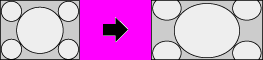
【img=S_scr_43_wide.full.png】- block_id: 38855 «C_DispSnd_AEP_Sformat_FSH»
- [Normal]
- block_id: 38856 «C_DispSnd_AEP_Sformat_FSH»
- Displays a 4:3 picture in its original size. Side bars are shown to fill the 16:9 screen.
- block_id: 38857 «C_DispSnd_AEP_Sformat_FSH»
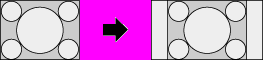
【img=S_scr_43_normal.full.png】
C_DispSnd_AEP_Sformat_FSH | FullScreen: Page 3
- block_id: 38858 «C_DispSnd_AEP_Sformat_FSH»
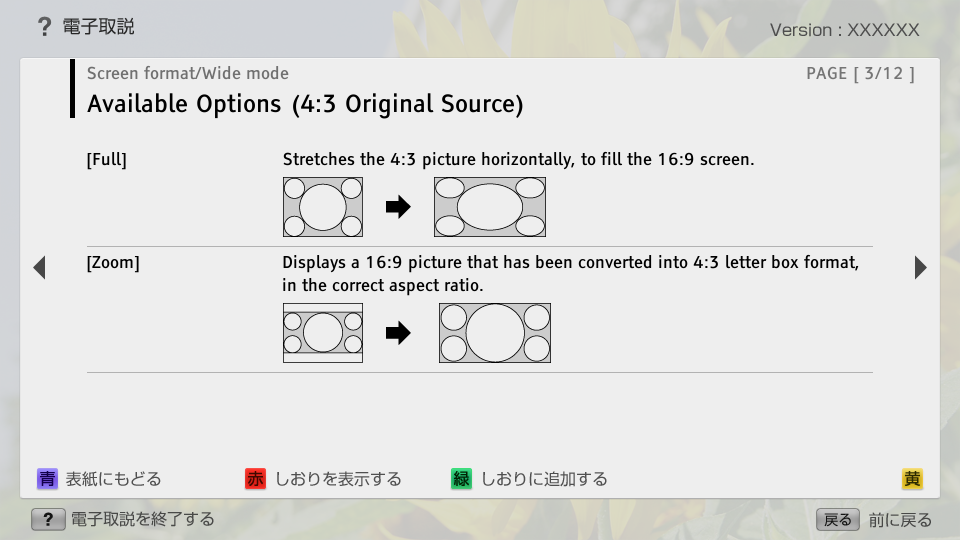
- [Full]
- block_id: 38859 «C_DispSnd_AEP_Sformat_FSH»
- Stretches the 4:3 picture horizontally, to fill the 16:9 screen.
- block_id: 38860 «C_DispSnd_AEP_Sformat_FSH»
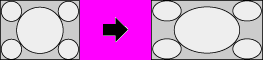
【img=S_scr_43_full.full.png】- block_id: 38861 «C_DispSnd_AEP_Sformat_FSH»
- [Zoom]
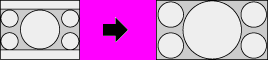
- block_id: 38862 «C_DispSnd_AEP_Sformat_FSH»
- Displays a 16:9 picture that has been converted into 4:3 letter box format, in the correct aspect ratio.
- block_id: 38863 «C_DispSnd_AEP_Sformat_FSH»
【img=S_scr_43_zoom.full.png】
C_DispSnd_AEP_Sformat_FSH | FullScreen: Page 4
- block_id: 38864 «C_DispSnd_AEP_Sformat_FSH»
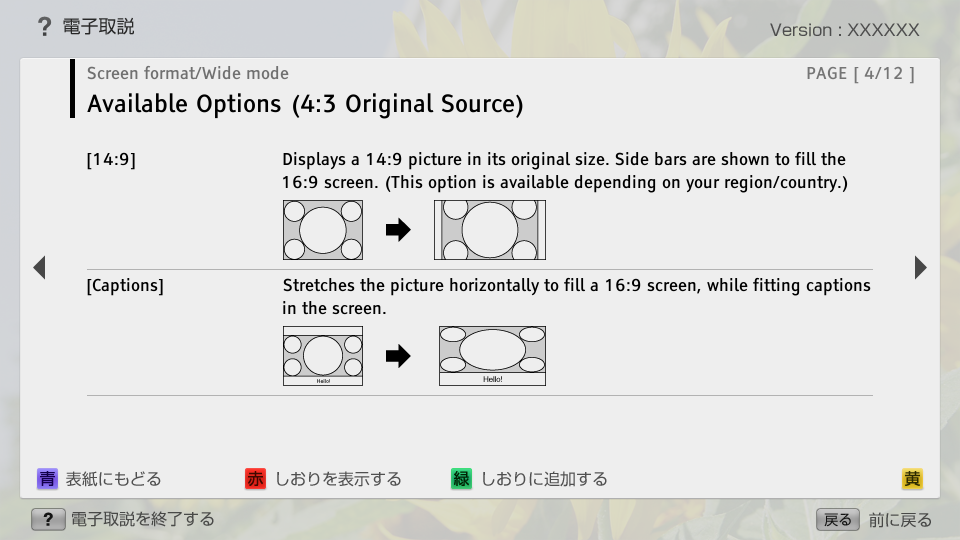
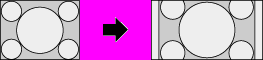
- [14:9]
- block_id: 38865 «C_DispSnd_AEP_Sformat_FSH»
- Displays a 14:9 picture in its original size. Side bars are shown to fill the 16:9 screen. (This option is available depending on your region/country.)
- block_id: 38866 «C_DispSnd_AEP_Sformat_FSH»
【img=S_scr_43_149.full.png】- block_id: 38867 «C_DispSnd_AEP_Sformat_FSH»
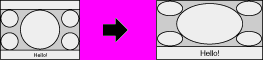
- [Captions]
- block_id: 38868 «C_DispSnd_AEP_Sformat_FSH»
- Stretches the picture horizontally to fill a 16:9 screen, while fitting captions in the screen.
- block_id: 38869 «C_DispSnd_AEP_Sformat_FSH»
【img=S_scr_43_smart_cap.full.png】
C_DispSnd_AEP_Sformat_FSH | FullScreen: Page 5
- block_id: 38870 «C_DispSnd_AEP_Sformat_FSH»
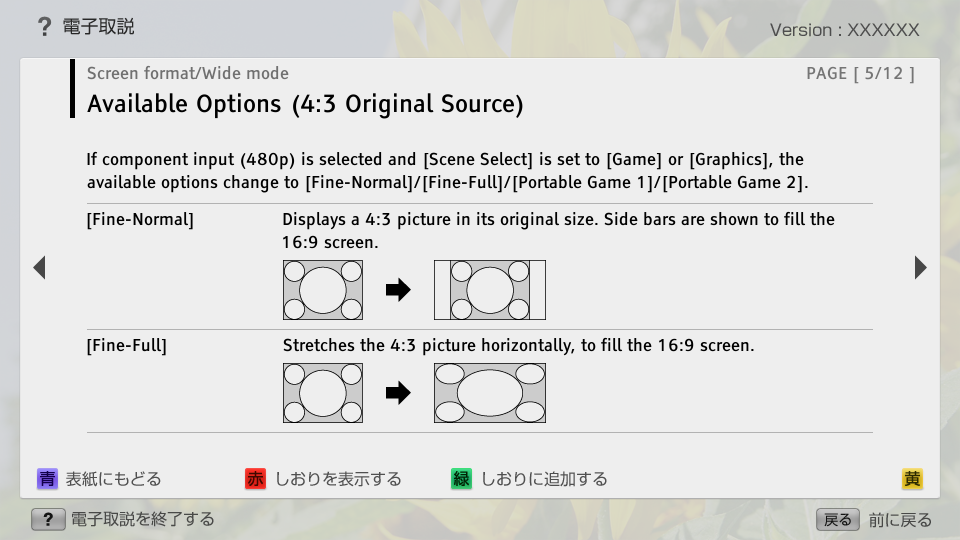
- If component input (480p) is selected and [Scene Select] is set to [Game] or [Graphics], the available options change to [Fine-Normal]/[Fine-Full]/[Portable Game 1]/[Portable Game 2].
- block_id: 38871 «C_DispSnd_AEP_Sformat_FSH»
- [Fine-Normal]
- block_id: 38872 «C_DispSnd_AEP_Sformat_FSH»
- Displays a 4:3 picture in its original size. Side bars are shown to fill the 16:9 screen.
- block_id: 38873 «C_DispSnd_AEP_Sformat_FSH»
【img=S_scr_43_normal.full.png】- block_id: 38874 «C_DispSnd_AEP_Sformat_FSH»
- [Fine-Full]
- block_id: 38875 «C_DispSnd_AEP_Sformat_FSH»
- Stretches the 4:3 picture horizontally, to fill the 16:9 screen.
- block_id: 38876 «C_DispSnd_AEP_Sformat_FSH»
【img=S_scr_43_full.full.png】
C_DispSnd_AEP_Sformat_FSH | FullScreen: Page 6
- block_id: 38877 «C_DispSnd_AEP_Sformat_FSH»
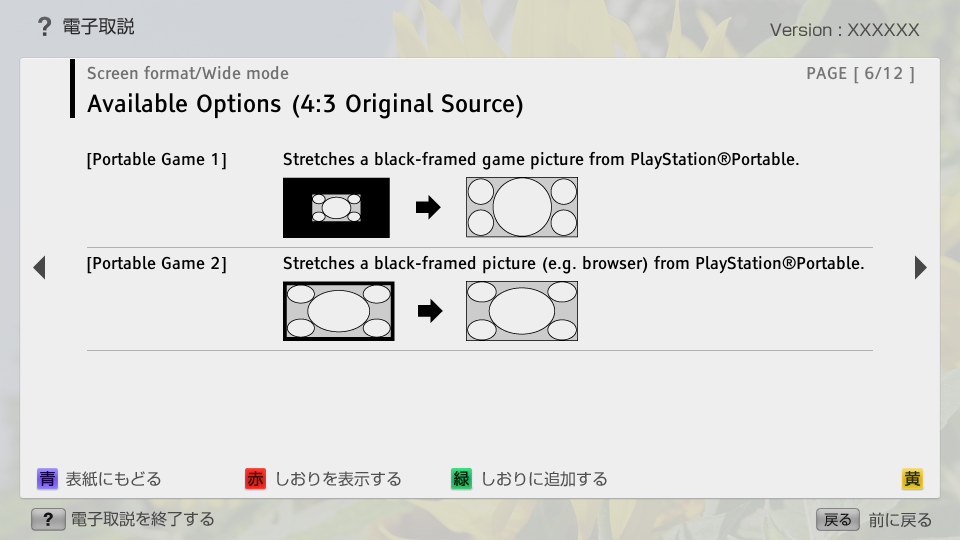
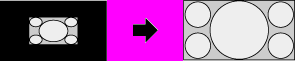
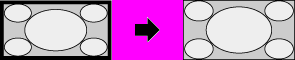
- [Portable Game 1]
- block_id: 38878 «C_DispSnd_AEP_Sformat_FSH»
- Stretches a black-framed game picture from PlayStation®Portable.
- block_id: 38879 «C_DispSnd_AEP_Sformat_FSH»
【img=S_scr_43_game_p1.full.png】- block_id: 38880 «C_DispSnd_AEP_Sformat_FSH»
- [Portable Game 2]
- block_id: 38881 «C_DispSnd_AEP_Sformat_FSH»
- Stretches a black-framed picture (e.g. browser) from PlayStation®Portable.
- block_id: 38882 «C_DispSnd_AEP_Sformat_FSH»
【img=S_scr_43_game.full.png】
C_DispSnd_AEP_Sformat_FSH | FullScreen: Page 7
- block_id: 38883 «C_DispSnd_AEP_Sformat_FSH»
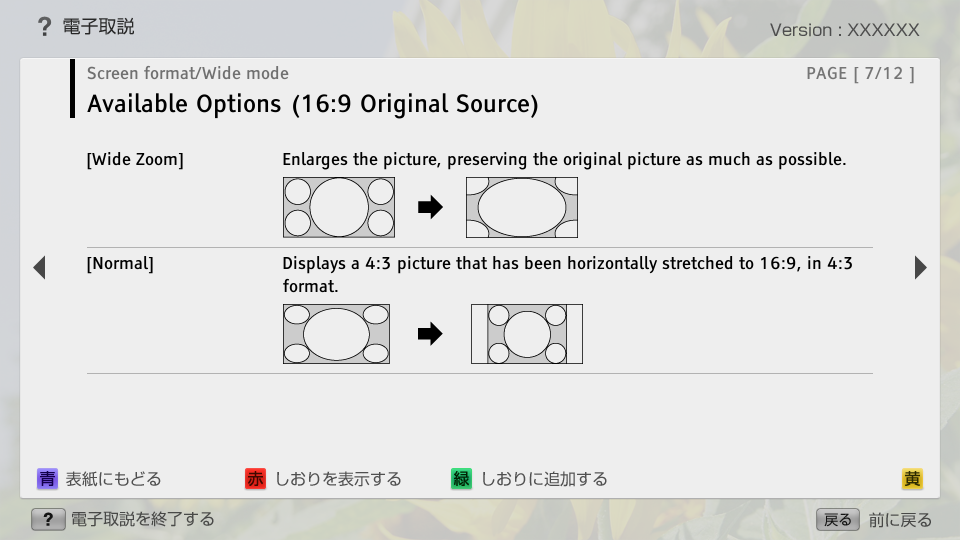
- Available Options (16:9 Original Source)
- block_id: 38884 «C_DispSnd_AEP_Sformat_FSH»
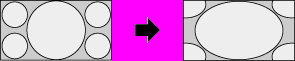
- [Wide Zoom]
- block_id: 38885 «C_DispSnd_AEP_Sformat_FSH»
- Enlarges the picture, preserving the original picture as much as possible.
- block_id: 38886 «C_DispSnd_AEP_Sformat_FSH»
【img=S_scr_169_widezoom.full.png】- block_id: 38887 «C_DispSnd_AEP_Sformat_FSH»
- [Normal]
- block_id: 38888 «C_DispSnd_AEP_Sformat_FSH»
- Displays a 4:3 picture that has been horizontally stretched to 16:9, in 4:3 format.
- block_id: 38889 «C_DispSnd_AEP_Sformat_FSH»

【img=S_scr_169_normal.full.png】
C_DispSnd_AEP_Sformat_FSH | FullScreen: Page 8
- block_id: 38890 «C_DispSnd_AEP_Sformat_FSH»
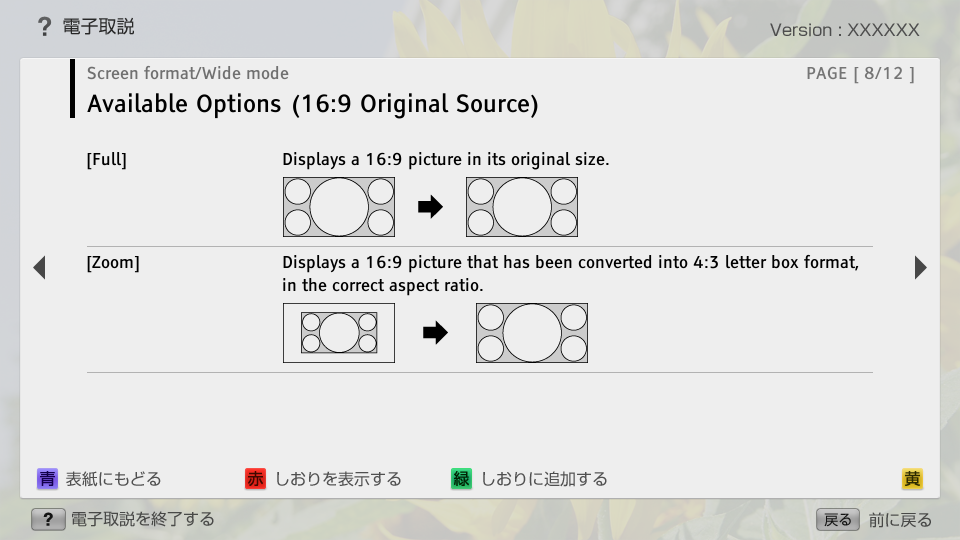
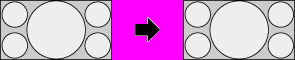
- [Full]
- block_id: 38891 «C_DispSnd_AEP_Sformat_FSH»
- Displays a 16:9 picture in its original size.
- block_id: 38892 «C_DispSnd_AEP_Sformat_FSH»
【img=S_scr_169_full.full.png】- block_id: 38893 «C_DispSnd_AEP_Sformat_FSH»
- [Zoom]
- block_id: 38894 «C_DispSnd_AEP_Sformat_FSH»
- Displays a 16:9 picture that has been converted into 4:3 letter box format, in the correct aspect ratio.
- block_id: 38895 «C_DispSnd_AEP_Sformat_FSH»

【img=S_scr_169_zoom.full.png】
C_DispSnd_AEP_Sformat_FSH | FullScreen: Page 9
- block_id: 38896 «C_DispSnd_AEP_Sformat_FSH»
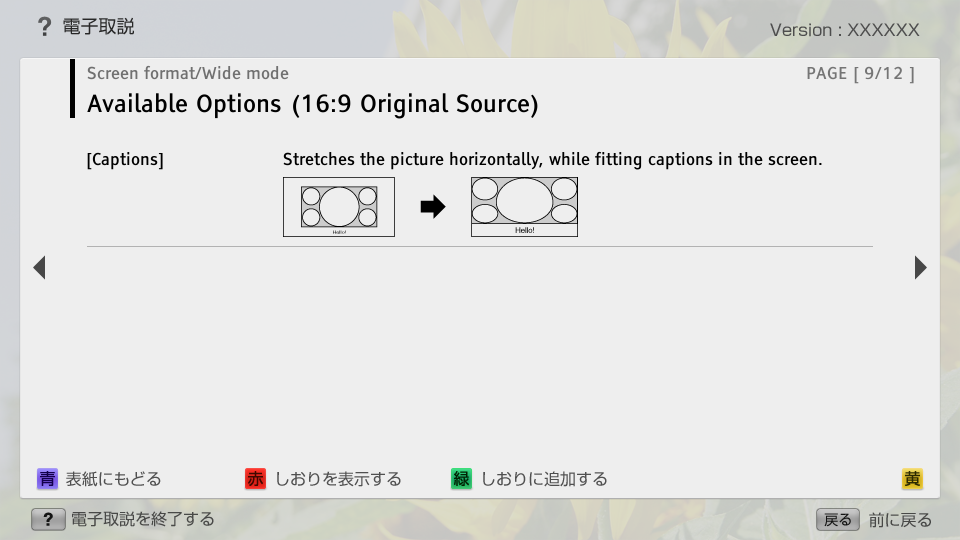
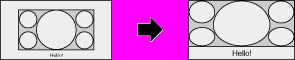
- [Captions]
- block_id: 38897 «C_DispSnd_AEP_Sformat_FSH»
- Stretches the picture horizontally, while fitting captions in the screen.
- block_id: 38898 «C_DispSnd_AEP_Sformat_FSH»
【img=S_scr_169_caption.full.png】
C_DispSnd_AEP_Sformat_FSH | FullScreen: Page 10
- block_id: 38899 «C_DispSnd_AEP_Sformat_FSH»
- Available Options (4K (4096×2160) Original Source)
- block_id: 38900 «C_DispSnd_AEP_Sformat_FSH»
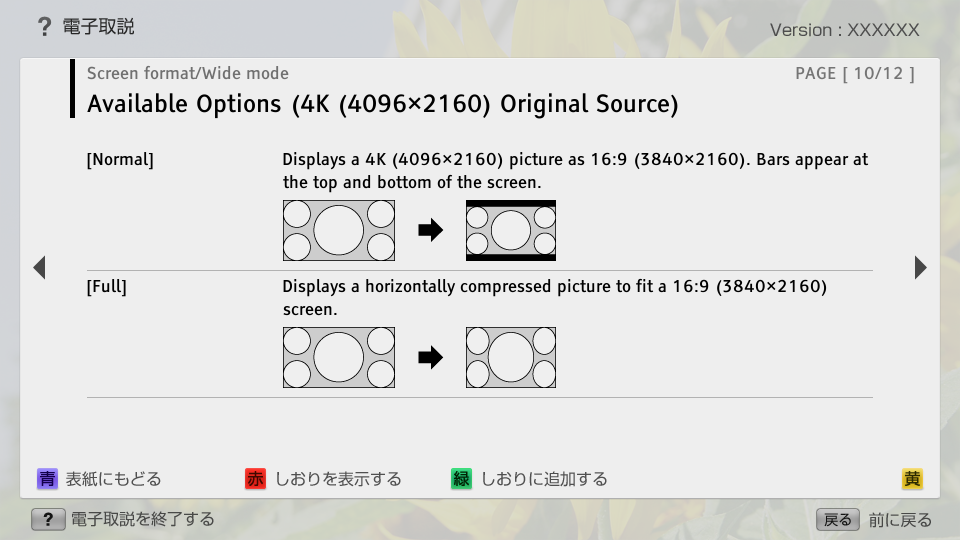
- [Normal]
- block_id: 38901 «C_DispSnd_AEP_Sformat_FSH»
- Displays a 4K (4096×2160) picture as 16:9 (3840×2160). Bars appear at the top and bottom of the screen.
- block_id: 38902 «C_DispSnd_AEP_Sformat_FSH»

【img=S_scr_FSH_normal.full.png】- block_id: 38903 «C_DispSnd_AEP_Sformat_FSH»
- [Full]
- block_id: 38904 «C_DispSnd_AEP_Sformat_FSH»
- Displays a horizontally compressed picture to fit a 16:9 (3840×2160) screen.
- block_id: 38905 «C_DispSnd_AEP_Sformat_FSH»

【img=S_scr_FSH_full.full.png】
C_DispSnd_AEP_Sformat_FSH | FullScreen: Page 11
- block_id: 38906 «C_DispSnd_AEP_Sformat_FSH»
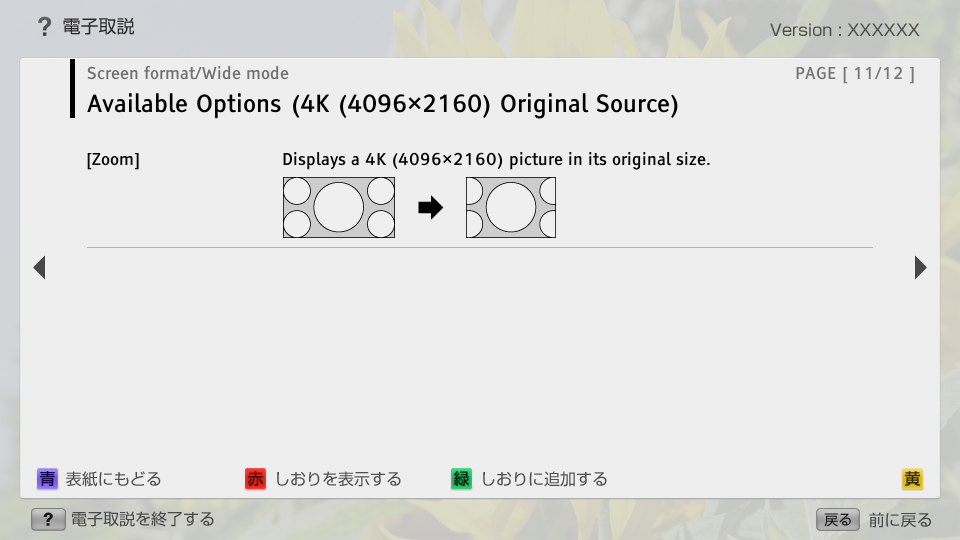
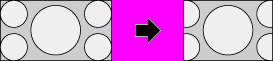
- [Zoom]
- block_id: 38907 «C_DispSnd_AEP_Sformat_FSH»
- Displays a 4K (4096×2160) picture in its original size.
- block_id: 38908 «C_DispSnd_AEP_Sformat_FSH»
【img=S_scr_FSH_zoom.full.png】
C_DispSnd_AEP_Sformat_FSH | FullScreen: Page 12
- block_id: 38909 «C_DispSnd_AEP_Sformat_FSH»
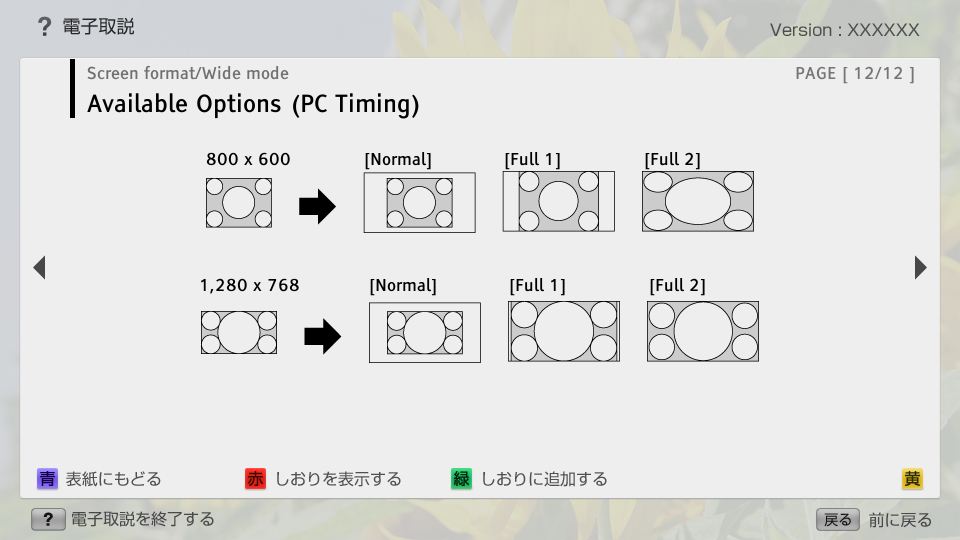
- Available Options (PC Timing)
- block_id: 38910 «C_DispSnd_AEP_Sformat_FSH»

【img=S_scr_pc_800600.full.png】- block_id: 38911 «C_DispSnd_AEP_Sformat_FSH»
- 800 x 600
- block_id: 38912 «C_DispSnd_AEP_Sformat_FSH»
- [Normal]
- block_id: 38913 «C_DispSnd_AEP_Sformat_FSH»
- [Full 1]
- block_id: 38914 «C_DispSnd_AEP_Sformat_FSH»
- [Full 2]
- block_id: 38915 «C_DispSnd_AEP_Sformat_FSH»

【img=S_scr_pc_1280768.full.png】- block_id: 38916 «C_DispSnd_AEP_Sformat_FSH»
- 1,280 x 768
- block_id: 38917 «C_DispSnd_AEP_Sformat_FSH»
- [Normal]
- block_id: 38918 «C_DispSnd_AEP_Sformat_FSH»
- [Full 1]
- block_id: 38919 «C_DispSnd_AEP_Sformat_FSH»
- [Full 2]