EPGsony_AEP 【AEP/eng】
【topic_No. 137】 toctext:
|
area flag | ||||||
|---|---|---|---|---|---|---|---|
| JP | |||||||
| 0 | |||||||
| ATSC-UC | ATSC-LTN | ATSC-KR | |||||
| 0 | 0 | 0 | |||||
| ISDB-LTN_BRZ | ISDB-LTN_AR | ISDB-LTN_except_BRAR | ISDB-LTN_NoGinga | DVB-LTN | |||
| 0 | 0 | 0 | 0 | 0 | |||
| DTMB-CH | DTMB-HK | DVB-TW | |||||
| 0 | 0 | 0 | |||||
| DVB-GA_D-Full_AUS_SIN_SA | DVB-GA_D-Full_NZ | DVB-GA_D-Simple | DVB-GA_NoSkype | ||||
| 0 | 0 | 0 | 0 | ||||
| DVB-AEP | DVB-AEP_MHP | DVB-GA-T2_NoSkype | |||||
| 1 | 1 | 0 | |||||
| model flag | |||||||
| 3aG | 3a | P2A | 3a_wifi_Ready | P2S | 2b-1N | 3a-L | |
| 1 | 1 | 1 | 1 | 1 | 1 | 0 | |
| FSH | |||||||
| 0 | |||||||
EPGsony_AEP | FullScreen: Page 1
- block_id: 30146 «EPGsony_AEP»
- Overview
- block_id: 30147 «EPGsony_AEP»
- You can quickly find your preferred programmes and the detailed programme information. You can also search programmes by genre, register your preferred programmes, etc. (This function is available only for digital broadcasts, and depends on your model/region/country.)
- block_id: 30148 «EPGsony_AEP»
【img=i_wepgS_pre.full.png】
EPGsony_AEP | FullScreen: Page 2
- block_id: 30149 «EPGsony_AEP»
- Steps
- block_id: 30150 «EPGsony_AEP»
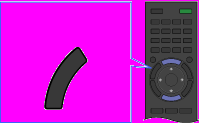
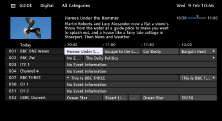
- 1. Press the GUIDE button to display the digital programme guide.
- block_id: 30151 «EPGsony_AEP»
【img=i_wRM_guide_caption.full.png】- block_id: 33150 «EPGsony_AEP»
- GUIDE
- block_id: 30152 «EPGsony_AEP»
- 2. Select the programme to watch using the
 /
/ /
/ /
/ buttons, then press the
  button.
 - block_id: 30153 «EPGsony_AEP»
【img=i_wepgS_OSD_S1.full.png】
EPGsony_AEP | FullScreen: Page 3
- block_id: 30154 «EPGsony_AEP»
- To close the digital programme guide, press the GUIDE button.
- block_id: 30155 «EPGsony_AEP»
- To search for programmes by genre
- block_id: 30156 «EPGsony_AEP»
- Press the OPTIONS button, select [Programme Genre List], the desired genre, then the desired programme.
- block_id: 30157 «EPGsony_AEP»
- To register your preferred channels
- block_id: 30158 «EPGsony_AEP»
- Press the OPTIONS button, select [Favourites Set-up], the desired category, then follow the on-screen instructions to register channels.
EPGsony_AEP | FullScreen: Page 4
- block_id: 30159 «EPGsony_AEP»
- To set reminders
- block_id: 37516 «EPGsony_AEP»
- You can set reminders for future programmes. After selecting a future programme in the guide, select [Reminder].
- block_id: 30160 «EPGsony_AEP»
- To list programmes with reminders set, press the HOME button, then select
 [Recordings] → [Timer List].
 - block_id: 30161 «EPGsony_AEP»
- (This function may not be available depending on your model/region/country.)
EPGsony_AEP | FullScreen: Page 5
- block_id: 30162 «EPGsony_AEP»
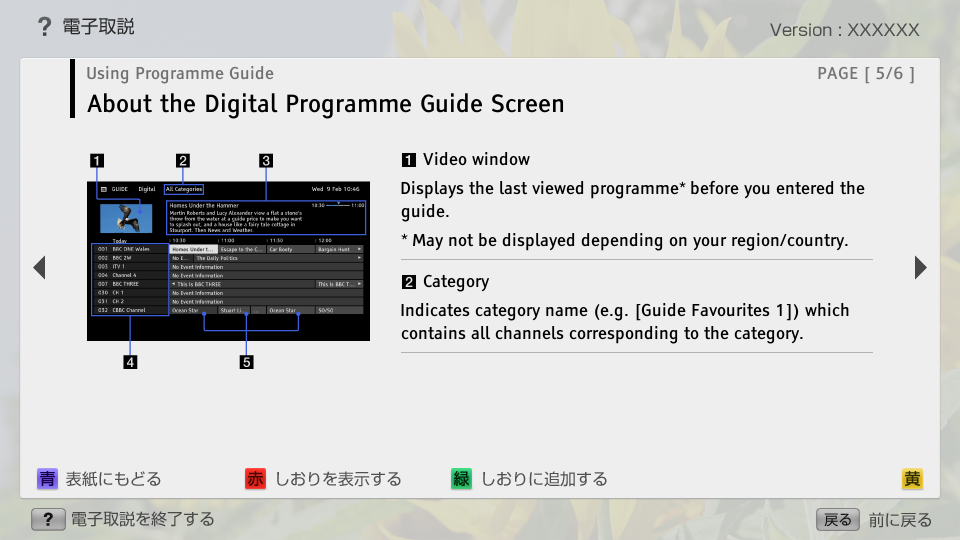
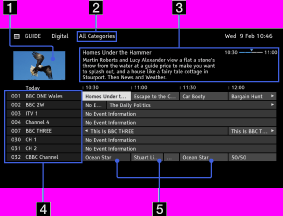
- About the Digital Programme Guide Screen
- block_id: 30163 «EPGsony_AEP»
【img=i_wepgS_OSD_S2.full.png】- block_id: 30164 «EPGsony_AEP»
- Video window
- block_id: 30165 «EPGsony_AEP»
- Displays the last viewed programme* before you entered the guide.
- block_id: 30166 «EPGsony_AEP»
- * May not be displayed depending on your region/country.
- block_id: 30167 «EPGsony_AEP»
- Category
- block_id: 30168 «EPGsony_AEP»
- Indicates category name (e.g. [Guide Favourites 1]) which contains all channels corresponding to the category.
EPGsony_AEP | FullScreen: Page 6
- block_id: 30169 «EPGsony_AEP»
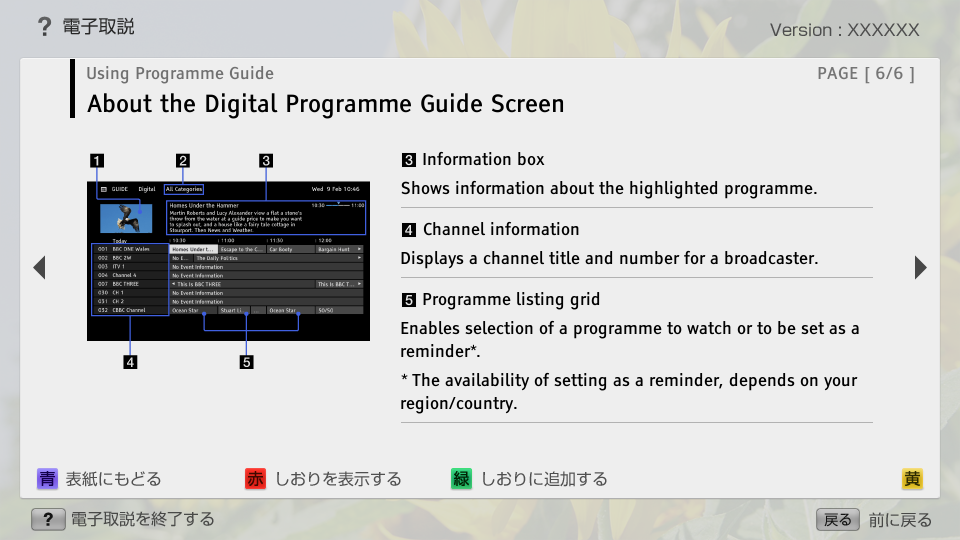
- Information box
- block_id: 30170 «EPGsony_AEP»
- Shows information about the highlighted programme.
- block_id: 30171 «EPGsony_AEP»
- Channel information
- block_id: 30172 «EPGsony_AEP»
- Displays a channel title and number for a broadcaster.
- block_id: 30173 «EPGsony_AEP»
- Programme listing grid
- block_id: 30174 «EPGsony_AEP»
- Enables selection of a programme to watch or to be set as a reminder*.
- block_id: 30175 «EPGsony_AEP»
- * The availability of setting as a reminder, depends on your region/country.