

- Top Page >
- Useful Functions >
- Blocking recorded content
Blocking recorded content
Overview
You can block recorded content by displaying a guidance that requires password input to access.
Steps
Press the HOME button, then select [Settings] using the
 /
/ buttons.
Select
 [System Settings] using the
  /
/ buttons, then press the
  button.
Select [Parental Lock] using the
/ buttons, then press the button.Press the
button in [PIN Code].Enter the password using the number buttons.
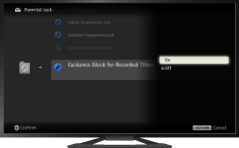
Select [Guidance Block for Recorded Titles] using the
/ buttons, then press the button.Select [On] using the
/ buttons, then press the button.
To return to the last viewed source, press the HOME button twice.
