

- Top Page >
- Using Internet >
- Setting IPv6
Setting IPv6
Making a Connection
If your provider's service is compatible with IPv6, you can connect this TV to the Internet by IPv6.
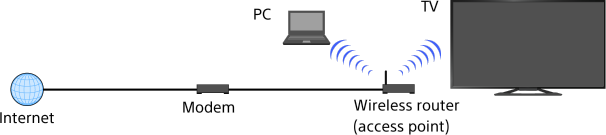
Example of wireless connection:
Steps
Make a broadband Internet connection.
Press the button to jump to the title list. Then, press the button again to go to “Wireless connection” or “Wired connection” in “Connecting to the Internet” for details.
Press the HOME button, then select [Settings] using the
 /
/ buttons.
Select
 [Network] using the
  /
/ buttons, then press the button.
Select [IPv6 Set-up] using the
/ buttons, then press the button.Select [Set up IPv6 connection] using the
/ buttons, then press the button.Follow the on-screen instructions to complete the set-up.
To return to the last viewed source, press the HOME button twice.
Notes
- If [IPv4: Failed] appears at [Connection Results], press the HOME button, then select [Settings] → [Network] → [Network Set-up], check the current network settings.
- If Internet services or websites are not compatible with IPv6, connect with IPv4.
