

- Top Page >
- Using Internet >
- Current View Information Search
Current View Information Search
Overview
This feature searches for information about the TV programme your are watching, or the currently-playing music title/artist name on your TV, from an Internet database. Music playing on a device connected to the TV can also be searched.
You can furthermore search for related information from your search results.

Tips
- As of March 2013, this function is available in the following regions/countries.
Czech Rep. / Denmark / Germany / Switzerland / Austria / United Kingdom / Ireland / Spain / France / Italy / Netherlands / Belgium / Luxembourg / Norway / Poland / Russia / Slovakia / Finland / Sweden / New Zealand / Australia / United States / Canada
Steps
Make a broadband Internet connection.
While a TV programme, video file or music is playing, press the RELATED SEARCH button.
- When watching a TV programme, information related to the programme will appear. Move to step 4.
- For content other than TV programmes, information related to music currently playing will appear. Move to step 3.
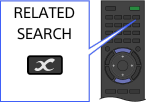
To view more detailed information, select a search result using the
 /
/ buttons, then press the
  button.
If a message appears displaying the number of search results at the bottom right of the screen, press the button and follow the steps above.Detailed information about the currently-playing programme or music will appear.
To view related detailed information, switch the tabs using the /
/ buttons.
To operate the search result
Select [Action] in the [Details] tab using the / buttons, then press the button. You can operate [Watch] or [Add to Bookmarks], etc. (What you can operate depends on the search result conditions.)
To search again
Press the OPTIONS button, then select [Reload] using the / buttons.
To display a bookmark
Press the OPTIONS button, then select [TV/Video Bookmarks] or [Music Bookmarks] using the / buttons.
Notes
- Information may not be obtainable depending on what you watch.
- When watching TV via an external input, you cannot search information on TV programmes.
- For customers in the USA or Canada: When watching TV by a cable signal, you cannot search information on TV programmes.
