

- Top Page >
- Parts Description >
- Bottom
Bottom
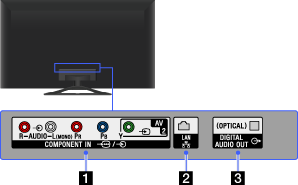
 AV2,
AV2,  /
/ COMPONENT IN
This input can be used as a composite video input or as a component video input. When connecting mono device, connect to the
L (MONO) audio jack (socket).For composite use, connect to
AV2 for video, and to (L/R) of / COMPONENT IN for audio signals.For component connection, use Y, PB, PR for video signals and also connect to
(L/R) for audio signals.- The TV will automatically detect and switch between AV2 and / COMPONENT IN. To manually set the input type, press the HOME button, then select [Settings] →
 [External Inputs] → [AV2/Component Input].
- The TV will automatically detect and switch between
 LAN
LAN
Connects to an existing network using an Ethernet cable.
- DIGITAL AUDIO OUT (OPTICAL)
You can listen to TV sound on a connected home theatre system with digital input.
