

- Top Page >
- Parts Description >
- Left
Left
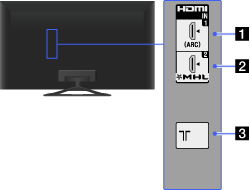
- HDMI IN 1
HDMI (High-Definition Multimedia Interface) provides an uncompressed, all-digital audio/video interface between this TV and any HDMI-equipped audio/video device. In addition, when you connect “BRAVIA” Sync-compatible device, communication with the connected device is supported.
- Be sure to use an authorised HIGH SPEED HDMI cable bearing the HDMI logo.
- HDMI IN 2/MHL
HDMI (High-Definition Multimedia Interface) provides an uncompressed, all-digital audio/video interface between this TV and any HDMI-equipped audio/video device. You can also connect your MHL device using an MHL cable. In addition, when you connect “BRAVIA” Sync-compatible device, communication with the connected device is supported.
- Be sure to use an authorised HIGH SPEED HDMI cable bearing the HDMI logo.
- If connecting a digital audio system that is compatible with Audio Return Channel (ARC) technology, use HDMI IN 1. If not, an additional connection with DIGITAL AUDIO OUT (OPTICAL) is necessary.

RF input that connects to your cable or antenna (aerial).
- For satellite-compatible models, a satellite input is also available.

