

- Top Page >
- Parts Description >
- Rear
Rear
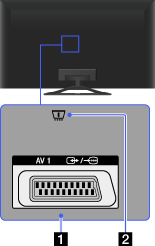
 /
/ AV1
AV1
Connect with a SCART cable. When you connect an analogue decoder, the TV tuner outputs scrambled signals to the decoder, and the decoder unscrambles the signals before outputting them.
- The SCART out setting must be made when outputting digital RF on certain models or in certain regions. Press the OPTIONS button, then select [SCART REC on].
 CAM (Conditional Access Module)
Provides access to pay TV services. For details, refer to the instruction manual supplied with your CAM.
- Do not insert the smart card directly into the TV CAM slot. It must be fitted into the Conditional Access Module provided by your authorised dealer.
- CAM is not supported in some countries/areas. Check with your authorised dealer.
- A CAM message may appear when you switch to digital programme after using the Internet video.
