

- Top Page >
- Parts Description >
- Lower
Lower
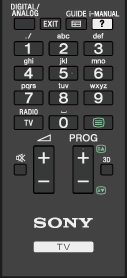
- DIGITAL/ANALOG
Press to switch between digital and analogue mode.
When viewing pictures from a connected device, press to return to the last viewed TV mode.
- EXIT
Press to return to the previous screen or exit from the menu. When an Interactive Application service is available, press to exit from the service.
 GUIDE
GUIDE
Press to display the digital programme guide.
The Guide feature may not be available in some regions/countries.
 i-MANUAL
Press to display the on-screen instruction manual (this manual).
- Number buttons/Alphabet buttons
In TV mode: Press to select channels.
In Text mode: Press to enter a page number and/or alphabetical characters.
When an Interactive Application service is available, you can also enter letters of the alphabet.
- TV/RADIO
Press to switch between TV or RADIO broadcasts.
 (Text)
Press to display text information.
