

- Top Page >
- Using Other Devices >
- Pausing a currently-viewed programme
Pausing a currently-viewed programme
Overview
You can pause the currently-viewed programme. This function is convenient if you need to take a break from viewing.
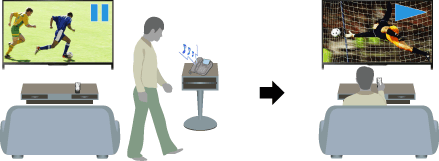
Steps
While viewing a programme, press the TV PAUSE button.
(When using the Touchpad Remote Control, press the Control Bar (
 ), slide the touchpad to highlight the TV PAUSE button, then press the touchpad to select.)
The TV starts recording the programme temporarily onto the USB HDD device.
Press the
 button to continue viewing the programme.
(When using the Touchpad Remote Control, press the Control Bar (
), slide the touchpad to highlight the button, then press the touchpad to select.)
To return to the live programme, press the  button.
(When using the Touchpad Remote Control, press the Control Bar (), slide the touchpad to highlight the button, then press the touchpad to select.)
Tips
- The programme will be paused (recorded temporarily) for up to 8 hours.
Notes
- The temporarily recorded content will be deleted from the USB HDD device once you exit the pause mode by pressing the button or switching the channel.
(When using the Touchpad Remote Control, press the Control Bar (
), slide the touchpad to highlight the button, then press the touchpad to select.)
- The pause mode will be cancelled if timer recording starts. However, you can view the paused programme until the point the timer recording started.
