

- Top Page >
- Parts Description >
- Rear
Rear
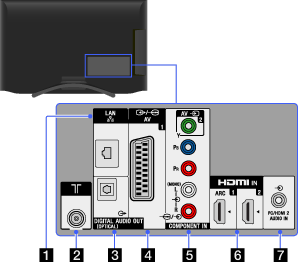
 LAN
LAN
Connects to an existing network using an Ethernet cable.

RF input that connects to your cable or antenna (aerial).
- For satellite-compatible models, a satellite input is also available.

- For satellite-compatible models, a satellite input is also available.
- DIGITAL AUDIO OUT (OPTICAL)
You can listen to TV sound on a connected home theatre system with digital input.
 /
/ AV1
AV1
Connect with a SCART cable. When you connect an analogue decoder, the TV tuner outputs scrambled signals to the decoder, and the decoder unscrambles the signals before outputting them.
- The SCART out setting must be made when outputting digital RF on certain models or in certain regions. Press the OPTIONS button, then select [SCART REC on].
 AV2, /
 COMPONENT IN
This input can be used as a composite video input or as a component video input. When connecting mono device, connect to the
L (MONO) audio jack (socket).For composite use, connect to
AV2 for video, and to (L/R) of / COMPONENT IN for audio signals.For component connection, use Y, PB, PR for video signals and also connect to
(L/R) for audio signals.- The TV will automatically detect and switch between AV2 and / COMPONENT IN. To manually set the input type, press the HOME button, select
 [Settings] →
  [External Inputs] → [AV2/Component Input].
- The TV will automatically detect and switch between
- HDMI IN 1/2
HDMI (High-Definition Multimedia Interface) provides an uncompressed, all-digital audio/video interface between this TV and any HDMI-equipped audio/video device. In addition, when you connect device that is compatible with “Control for HDMI”, communication with the connected device is supported.
- Be sure to use only an authorised HDMI cable bearing the HDMI logo.
- If connecting a digital audio system that is compatible with Audio Return Channel (ARC) technology, use HDMI IN 1. If not, an additional connection with DIGITAL AUDIO OUT (OPTICAL) is necessary.
- If the device has a DVI jack (socket), connect it to HDMI IN 2 through a DVI - HDMI adaptor interface (not supplied), and connect the device's audio out jacks (sockets) to PC/HDMI 2 AUDIO IN.
- PC/HDMI 2 AUDIO IN
This input can be used as a PC audio input, or HDMI2 analogue audio input.
When connecting a PC, connect its audio out jacks (sockets) with a suitable audio cable (not supplied). When connecting a device that has DVI jack (socket), use its analogue audio out jacks (sockets).
