

- Top Page >
- Parts Description >
- Right
Right
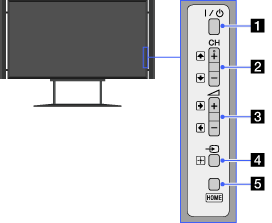
The TV illustrations shown on these pages are samples only. They differ from the images you will see on your actual TV.
 (Power)
Press to turn on the TV or to enter standby mode.
- CH +/– (Channel)/
 /
/
Press to select the next (+) or previous (–) channel.
- In the TV Home Menu, these buttons will work as /.
- In the TV Home Menu, these buttons will work as
 +/– (Volume)/
 /
/
Press to adjust the volume.
- In the TV Home Menu, these buttons will work as /.
- In the TV Home Menu, these buttons will work as
 (Input select)/
 (Select/Confirm)
Press to display a list of inputs.
To select the connected device input, press this button repeatedly.
- In the TV Home Menu, this button will work as (select/confirm).
- In the TV Home Menu, this button will work as
- HOME
Press to display the TV Home Menu.
