

- Top Page >
- Watching TV >
- Using the Program Guide
Using the Program Guide
Overview
You can quickly find your preferred programs and the detailed program information. The current program information and weekly program guides for the next eight days are provided. (This function is available only for digital broadcasts, and depends on your region/country. In some countries, it is available only on the setting of  [Settings] →
  [Preferences] → [GUIDE Key Behavior] → [Launch Guide].)
Steps
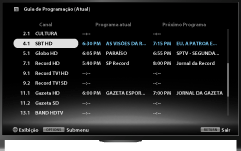
Press the GUIDE button to display the digital program guide (current).
(When using the Touchpad Remote Control, press the Control Bar (
 ), slide the touchpad to highlight the GUIDE button, then press the touchpad to select.)
Select the program to watch.
To close the digital program guide, press the GUIDE button.
(When using the Touchpad Remote Control, press the Control Bar (), slide the touchpad to highlight the GUIDE button, then press the touchpad to select.)
To use the weekly program guide
While watching a program, press the OPTIONS button, then select [Program Guide].
About the Program Guide (Current) Screen
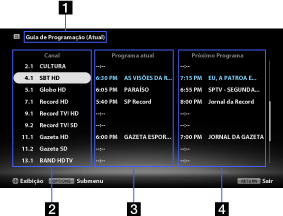
- Program guide screen name
Displays the current program guide.
- Channel information
Displays a channel number and title for a broadcaster.
- Current program list
Displays a listing of currently broadcast programs. You can view a selected program by highlighting it and pressing the
 button (or pressing the touchpad on the Touchpad Remote Control).
 - Next program list
Displays a listing of subsequent programs.
About the Program Guide Screen
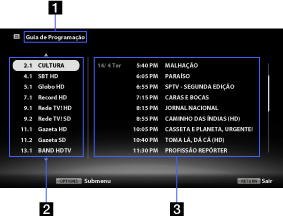
- Program guide screen name
Displays the weekly program guide service.
- Channel information
Displays a channel number and title for a broadcaster. A weekly listing for the highlighted channel appears on the program list.
- Program list
Displays a program schedule for the selected channel. You can display program information by highlighting a program and pressing the
button (or pressing the touchpad on the Touchpad Remote Control).
