

- Top Page >
- Watching TV >
- DTVi (Ginga) Interactivity
DTVi (Ginga) Interactivity
Overview
DTVi (Ginga) Interactivity is a functionality that provides extended programming contents information such as sports statistics, soap opera chapters and characters, publicity, merchandising, weather information, news, etc., through high-quality digital texts and graphics along with advanced options. (This function is only available for a digital broadcast, and may not be available depending on your region.)
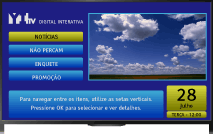
DTVi (Ginga) Interactivity also offers interactivity that allows you to communicate with the broadcaster through the return channel, if available in your home, in scenarios such as polls, quizzes, games and so on. These services are provided by broadcasters. Select a digital channel that provides Ginga applications.
Tips
- Ginga® functionality supported on this product is in conformance with Profile A defined in Interactivity Standard of Brazilian Digital TV System ABNT NBR-15606. Thus, this product does not support MPEG-1 Video Clip in Ginga® applications.
- Ginga® is a registered trademark of PUC-Rio/UFPB.
NCL® is a registered trademark of PUC-Rio.
Notes
- Available functions and screen components vary depending on the broadcaster.
