
You can copy MP3 files from your computer to the IC recorder by dragging and dropping them, and you can then play them back on the IC recorder.
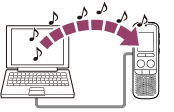
- Connect the IC recorder to your computer.
- Copy the MP3 files to the IC recorder.
On a Windows screen using Explorer, and on a Mac screen using Finder, drag and drop the files into one of the folders from A to E located under the “VOICE” folder that is in the “IC_RECORDER” folder on your computer. You can copy up to 99 files to one folder.
- Disconnect the IC recorder from your computer.