You can check the system information such as the version number of the software.
- In the stop mode, press MENU to enter the menu mode.
- Press
 or
or  to select “SYSTEM,” and then press
  PLAY/ENTER.
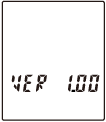
- Press
 (stop) to exit the menu mode.
 Help Guide
You can check the system information such as the version number of the software.
or to select “SYSTEM,” and then press PLAY/ENTER.
(stop) to exit the menu mode.