
Note
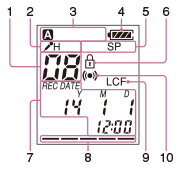
- The window shown above displays indications, numbers or items for explanatory purposes. The actual window may differ from those displayed here.
- File number indicator
Displays the file number you have selected.
- Microphone sensitivity indicator
Displays the level of the microphone sensitivity that has been set in the menu.
 : High
 : Low
: Low - Folder indicator
Displays the folder you have selected.
-
Battery indicator
Displays the remaining battery power.
-
Recording mode indicator
The recording mode selected in the menu is displayed.
SHQ: Super high quality mode
HQ: High quality mode
SP: Standard play mode
LP: Long play mode
- Protect indicator
Appears when the protection is set for a file.
- REC DATE (recorded date) indicators
Appears when the recorded date and time is displayed on the counter (with the “REC DATE” indicator).
- Remaining memory indicator
Displays the remaining memory and decreases one by one during recording.
- LCF (Low Cut Filter) indicator
Appears when “LCF” is set to “ON” in the menu.
- Alarm indicator
Appears when the alarm is set in a file.