
Note
- The window shown above displays indications, numbers or items for explanatory purposes. The actual window may differ from those displayed here.
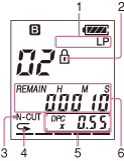
- Recording mode indicator
When the IC recorder is playing a file, the recording mode of the file is displayed.
SHQ: Super high quality mode
HQ: High quality mode
SP: Standard play mode
LP: Long play mode
- Protect indicator
Appears when the protection is set for a file.
- N-CUT (Noise Cut) indicator
Appears when the noise cut function is active. You can set “N-CUT” to “ON” in the menu.
 (repeat play) indicator
Appears when a file is played back repeatedly.
- DPC (Digital Pitch Control) indicator
Appears when the DPC (Digital Pitch Control) function is set in the menu.
You can adjust the playback speed in the menu.
- Counter indication
You can select the display mode in the menu.
ELAPSE: Displays the elapsed playback time of a file.
REMAIN: Displays the remaining playback time of a file.