
IC RecorderICD-PX333/PX333F
Dividing a file at all the track mark positions
You can divide a file at all the track mark positions.
- Select the file you want to divide.
- In the stop mode, select DISP/MENU - “Divide” - “Divide All Track Marks,” and then press
 PLAY/STOP・ENTER.

“Divide All Track Marks?” appears on the display.
- Press –
 or
or  + to select “YES,” and then press PLAY/STOP・ENTER.
The “Dividing...” animation appears, and the file is divided at all the track mark positions. All the existing track marks in the files will be erased.
A suffix made up of a sequential number (“_01,” “_02”) is added each of the divided files.
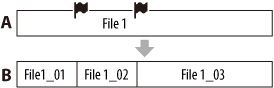
A. Before dividing a file:
 are track marks
B. After erasing track marks: A file is divided at all the track marks.
- Press
 (stop) to exit the menu mode.
Note
- You need a certain amount of free space in the memory media to divide a file.
- When you divide a file with a title and artist name, the newer part has the same title and artist name.
- You cannot divide files other than those recorded using the IC recorder (e.g., a file transferred from a computer). Moreover, when you edit files using the supplied Sound Organizer software, dividing files may not be possible.
- Once a file is divided, you cannot return it to the original status again.
- You cannot divide a protected file. To divide the file, release the protection first.
Hint
- To cancel dividing, select “NO” in step 3, and then press PLAY/STOP・ENTER.
- To cancel dividing while a file is being divided, press (stop) while the “Dividing...” animation is displayed.
 Go to Page Top