
IC RecorderICD-PX333/PX333F
Dividing a file at the current position
You can divide a file in the stop mode, so that the file is divided into two parts and new file numbers are added to the divided file names. By dividing a file, you can easily find the point from which you want to play back when you make a long recording such as at a meeting. You can divide a file until the total number of files in the folder reaches the maximum number allowed.
- Stop the file at the position where you want to divide a file.
- In the stop mode, select DISP/MENU - “Divide” - “Divide Current Position,” and then press
 PLAY/STOP・ENTER.
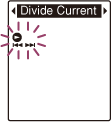
“Divide?” appears on the display.
- Press –
 or
or  + to select “YES,” and then press PLAY/STOP・ENTER.
The “Dividing...” animation appears, and the divided files will be suffixed with a sequential number (“_1” for the original file, and “_2” for the new file).
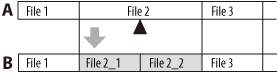
A. Before dividing a file:
 is the position you want to divide.
B. After dividing a file: A suffix made up of a sequential number is added to a file name of the divided files.
- Press
 (stop) to exit the menu mode.
Note
- You need a certain amount of free space in the memory media to divide a file.
- When you divide a file with a title and artist name, the newer part has the same title and artist name.
- You cannot divide files other than those recorded using the IC recorder (e.g., a file transferred from a computer). Moreover, when you edit files using the supplied Sound Organizer software, dividing files may not be possible.
- Once a file is divided, you cannot return it to the original status again.
- If you divide a file at the position within 0.5 seconds from a track mark, the track mark will be erased.
- Because of the system limitations, you cannot divide a file at the very beginning or at the very end of the file.
- You cannot divide a protected file. To divide the file, release the protection first.
Hint
- To cancel dividing, select “NO” in step 3, and then press PLAY/STOP・ENTER.
 Go to Page Top