
IC RecorderICD-PX333/PX333F
Starting to record automatically in response to sound – the VOR function
You can set the VOR (Voice Operated Recording) function to “ON,” to make the IC recorder start recording when the IC recorder detects sound, and pause when no sound is heard, eliminating recording during soundless periods.
- In the stop or recording mode, select DISP/MENU - “VOR,” and then press
 PLAY/STOP・ENTER.
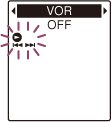
- Press –
 or
or  + to select “ON,” and then press PLAY/STOP・ENTER.
“VOR” is set to “OFF” when you purchase the IC recorder.
+ to select “ON,” and then press PLAY/STOP・ENTER.
“VOR” is set to “OFF” when you purchase the IC recorder. - Press
 (stop) to exit the menu mode.
 - Press
 REC/PAUSE.
“VOR” and “
 ” appears in the display window.
The recording pauses when no sound is detected and “PAUSE” flashes. When the IC recorder detects sound again, the recording starts again.
Note
- The VOR function is affected by the sound around you. Set “Mic Sensitivity” in the menu according to the recording conditions. If recording is not satisfactory after you have changed the “Mic Sensitivity” setting, or for an important recording, set “VOR” to “OFF” in the menu.
- During FM recording, the VOR function does not work (ICD-PX333F only).
Hint
- To cancel the VOR function, set “VOR” to “OFF” in step 2.
 Go to Page Top