
IC RecorderICD-PX333/PX333F
Selecting the input mode (Select Input)
You can select the external input to be recorded that is connected to the  (microphone) jack.
- In the stop mode, select DISP/MENU - “Detail Menu”-“Select Input,” and then press
 PLAY/STOP・ENTER.
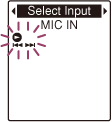
- Press –
 or
or  + to select “MIC IN” or “Audio IN,” and then press PLAY/STOP・ENTER.
 - Press
 (stop) to exit the menu mode.
Descriptions of menu items
You can select one of the menu items available.
MIC IN:
Select when you record files using an external microphone.
(Initial setting)
Audio IN:
Select when you record using other equipment.
 Go to Page Top