
IC RecorderICD-PX333/PX333F
Setting the clock
You need to set the clock to use the alarm function or record the date and time.
When you insert batteries for the first time, or when you insert batteries after the IC recorder has been without batteries for more than 1 minute, “Set Date&Time” appears, and then the clock setting window appears.
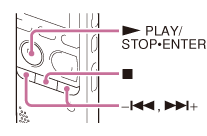
- Set year, month, day, hour and minute.
Press –
 or
or  + to set the year (the last two digits of the year), and then press
  PLAY/STOP・ENTER.
Repeat this procedure to set month, day, hour, and minute in sequence.
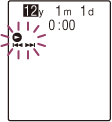
When you set the minute, the “Executing...” animation is displayed, and then the stop mode window appears.
Note
- If you do not press PLAY/STOP・ENTER within 1 minute of entering the clock setting data, the clock setting mode is canceled and the window will return to the display of the stop mode.
- When any button not intended for use in setting the clock is pressed during the clock setting mode, the clock setting is canceled. To set the clock, use the menu.
- The time is displayed either in 12-Hour with “AM” or “PM,” or in 24-Hour, depending on the “Time Display” setting in the menu. The default setting differs depending on the country or region you purchased the IC recorder.
Hint
- While the IC recorder is in the stop mode, press
 (stop) to display the current date and time for about 3 seconds.
 - You can set the clock using the menu as well.
 Go to Page Top