
IC RecorderICD-PX333/PX333F
Searching the desired point quickly (Easy Search)
The Easy Search function allows you to quickly locate the point at which you wish to start playback.
- In the stop or playback mode, select DISP/MENU - “Easy Search,” and then press
 PLAY/STOP・ENTER.
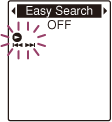
- Press –
 or
or  + to select “ON,” and then press PLAY/STOP・ENTER.
 - Press
 (stop) to exit the menu mode.
Descriptions of menu items
You can select one of the menu items available.
ON:
You can go back approx. 3 seconds by pressing – once, or advance approx. 10 seconds by pressing + once. This function is useful when attempting to locate desired point in a long recording.
OFF:
The easy search function does not work. When you press + or –, a file will be moved forward or backward.
(Initial setting)
 Go to Page Top