
IC RecorderICD-PX333/PX333F
Adding an overwrite recording during playback (Overwrite)
You can add an overwrite recording after a selected point in a recorded file. The part of the file after the selected point is erased.
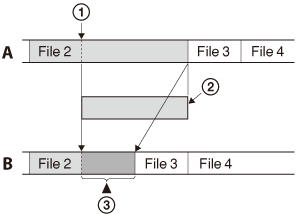
A. During playback of file 2
 : The starting point of an overwrite recording
 : The erased part of File 2
B. After adding an overwrite recording
 : Added overwrite recording in File 2
- Select the file to which you want to add an overwrite recording.
- In the stop mode, select DISP/MENU - “Add/Overwrite,” and then press
 PLAY/STOP・ENTER.
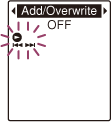
- Press –
 or
or  + to select “Overwrite,” and then press PLAY/STOP・ENTER.
 - Press
 (stop) to exit the menu mode.
 - When the file to be added is played back,
press
 REC/PAUSE at the position
where you want to overwrite the file.
REC/PAUSE at the position
where you want to overwrite the file.
“Overwrite REC?” will be displayed.
- While “Overwrite REC?” is displayed, press REC/PAUSE.
The operation indicator will turn red.
Then recording starts.
- Press (stop) to stop recording.
Recording overwrites the current file.
The file number and the total number of files in the folder remain unchanged.
Note
- You cannot add an overwrite recording to an MP3 file when the file has reached the maximum size limit (500 MB). However, you can add an overwrite recording to a file, even if the file has reached the maximum size limit, when the beginning of the point to the overwritten has not reached the maximum size limit.
- You cannot add an overwrite recording to an MP3 file which was not recorded using the IC recorder. Moreover, when you edit files using the supplied Sound Organizer software, adding an overwrite recording to the files may not be possible.
- The REC Mode of an additional overwrite recording is the same as the added file.
- If 10 minutes have passed after step 5, you must start the procedure again from step 5.
 Go to Page Top